Setting an English Paper, Section by Section
How to set up an English Language paper's sections — Objectives, Comprehension, Summary, Essay / Letter Writing, Oral English — and how to write each kind of question so it prints correctly.
What this guide covers
An English Language paper has more parts than most: objectives on lexis and structure, a comprehension passage, a summary passage, a choice of essay or letter topics, and oral English. Each part is a section of the paper, and each kind of question has to be written in the question bank in a particular way to print the way schools expect. This guide takes a JSS 1 third-term English paper through each section, showing the section's card in the builder and how it prints. The same rules apply to any subject with several parts — Literature, Nigerian languages, the sciences. For building a paper in general, see the Printed Exam Papers guide.
Before you start: what the question bank must hold
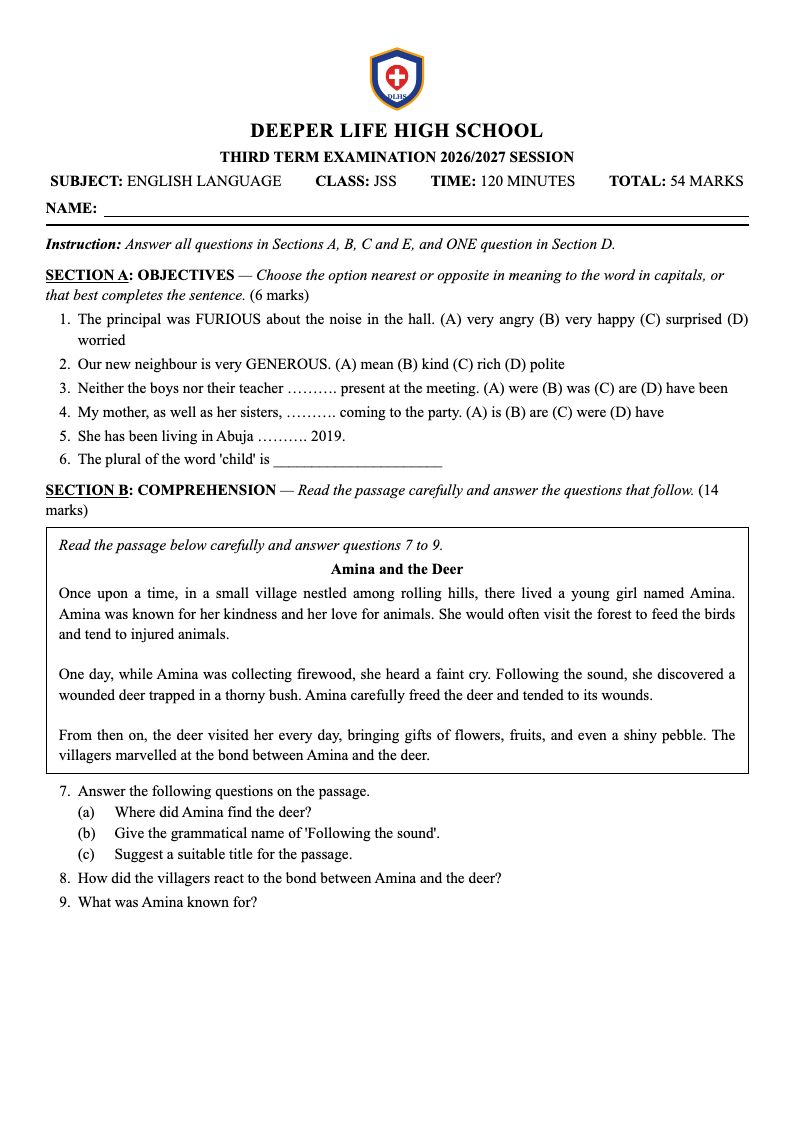
A paper can only use approved questions, and only those set to the paper's class, term and assessment. When you write a question in the Question Bank, give it the class (JSS 1), the term (Third term) and the assessment (Examination) of the paper it is for, and a topic that says which part of the paper it belongs to — Lexis and structure, Comprehension, Summary, Composition, Oral English. The topic is what you search for when adding questions, so a consistent topic saves time. Then submit it for review and approve it. When you open a saved paper to edit it, "Where questions come from" starts on the class, term and assessment its questions came from.
1. Start from the English template
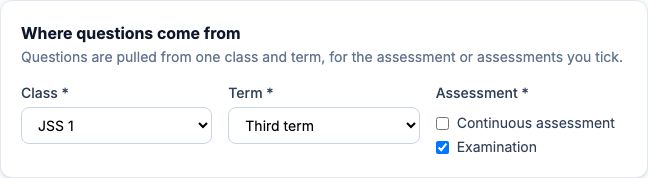
On a new paper with English Language as the subject, set "Template" to "English Language — WAEC format" and press "Use template". You get five sections in the usual order — Objectives, Comprehension, Summary, Essay / Letter Writing and Oral English — each with a heading and an instruction you can change. Every section card has a "Heading" (printed in capitals after the section letter), an "Instruction" (printed in italics beside it) and "Candidates answer": "All", or "Any" with a number for a section where candidates choose. The "Summary" beside the cards keeps the running total; with Any 1 on the essay section, only one essay's marks count.
Section A — Objectives (lexis and structure): how to write the questions
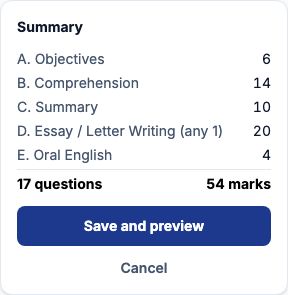
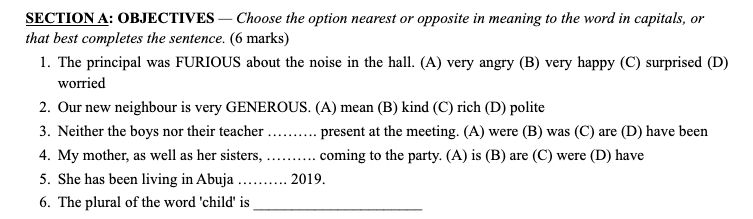
Write each as a Multiple choice question. Type only the sentence in the question, and only the words of each option — never the letters (A), (B): the paper adds them, and prints the options on the same line after the sentence, as school papers do. Mark the gap with dots or underscores, for example Neither the boys nor their teacher ………. present at the meeting. The question bank has no bold, italics or underlining, so write the word being tested in CAPITALS — The principal was FURIOUS about the noise in the hall — and say so in the section's "Instruction": Choose the option nearest or opposite in meaning to the word in capitals. A Fill in the blank question prints its own gap where you typed one; if the sentence has no gap, a writing line is added at its end. Keep options short; each objective is usually 1 mark.
Section A — how it prints
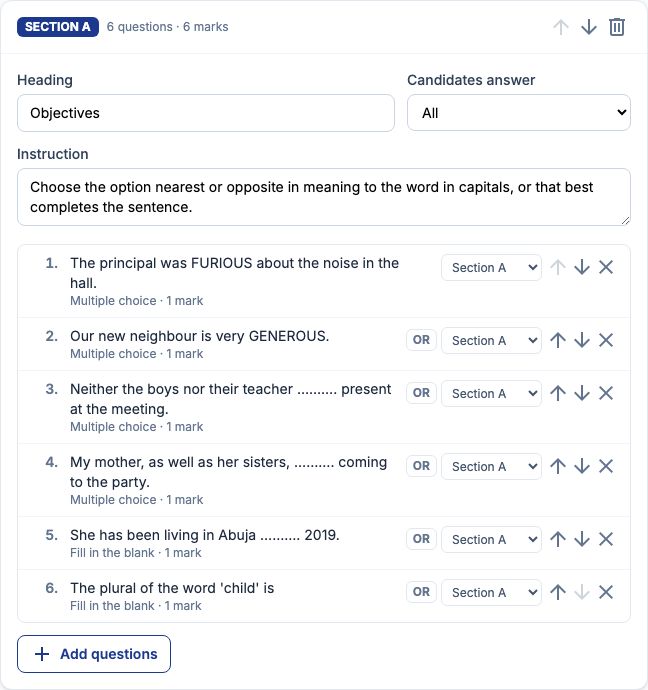
Each question is numbered, with its options (A) to (D) following on the same line; a long question wraps under its own text, not under the number. The fill-in-the-blank with a typed gap keeps it; the one without gets a line at the end. The section heading carries the instruction and the section's marks.
Section B — Comprehension: the passage and its questions
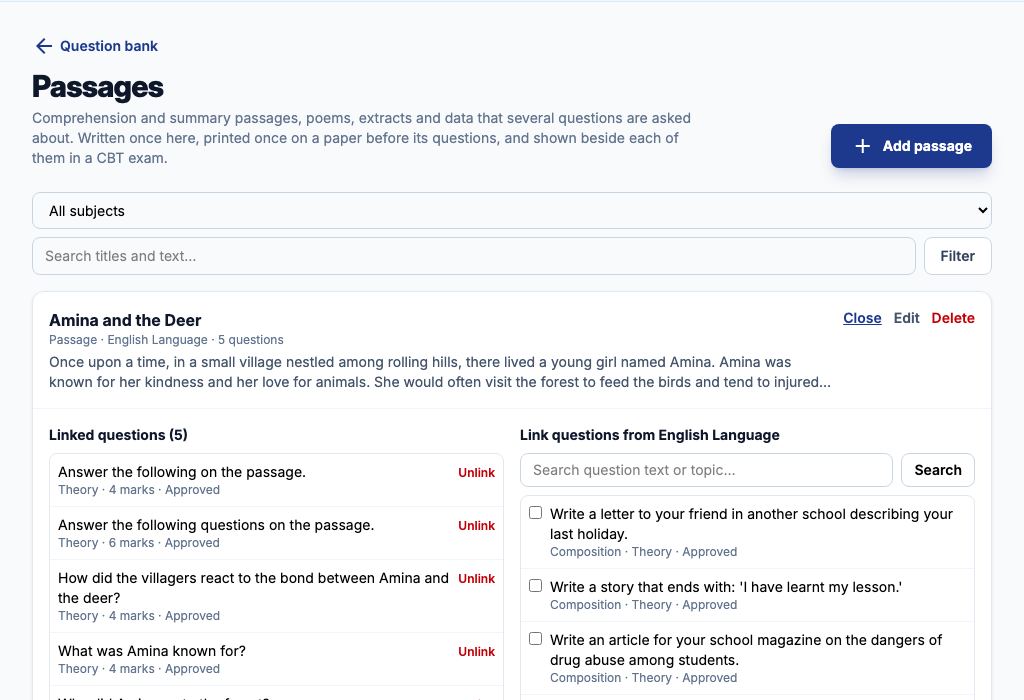
Write the passage once, on the Passages page (Exams → Question Bank, then "Passages"): press "Add passage", give it a "Title", set its "Kind" to a passage, choose English Language as its "Subject", and paste the story into "Text" with a blank line between paragraphs — each paragraph prints as typed. Press "Save passage". Write the comprehension questions as Theory questions. A question with several parts — (a) Where did Amina find the deer? (b) Give the grammatical name of … (c) Suggest a title — is ONE question: type Answer the following questions on the passage. as its text, then under "Parts (optional)" press "+ Add part" for each, with its own marks; the question is worth the total of its parts. Back on Passages, choose "Questions" on the passage, tick the questions about it and press "Link ticked questions".
Section B — adding them and how it prints
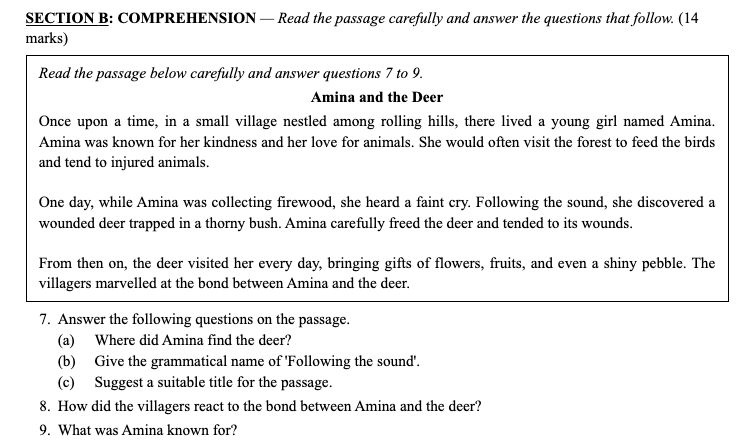
On the Comprehension card press "Add questions", search for the passage's title or one of its questions, and press "Add all questions on this passage": every approved question on it is added together, in order, each showing the passage's name on the card. Keep them next to each other — the passage prints once, in a box, before the first of them, with the line Read the passage below carefully and answer questions 7 to 9. If you move one away, the passage is printed again before it. Parts print under their question as (a), (b), (c).
Section C — Summary
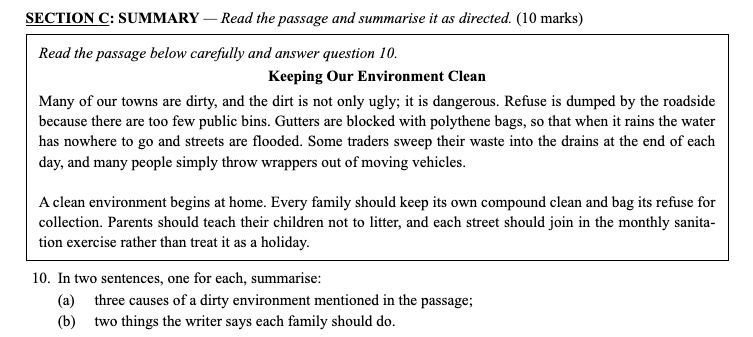
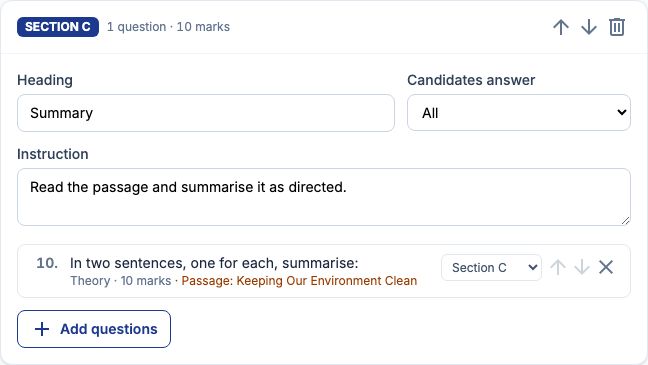
A summary needs its own passage: add it on the Passages page as for comprehension (for example Keeping Our Environment Clean). Write ONE Theory question for the summary, with the instruction as its text — In two sentences, one for each, summarise: — and each point as a part: (a) three causes of a dirty environment mentioned in the passage, 6 marks; (b) two things the writer says each family should do, 4 marks. Link it to the passage and add it to the Summary section. It prints with its passage boxed above it and the parts beneath.
Section D — Essay / Letter Writing
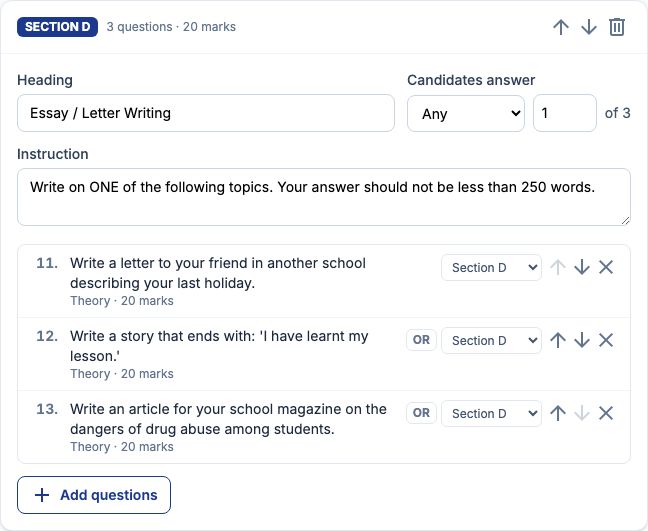
Write each topic as its own Theory question worth the full essay mark (20 here): Write a letter to your friend in another school describing your last holiday; Write a story that ends with: 'I have learnt my lesson.'; Write an article for your school magazine on the dangers of drug abuse among students. Put them all in the section, set "Candidates answer" to "Any" and 1 — the card shows of 3 — and keep the instruction Write on ONE of the following topics. Your answer should not be less than 250 words. The total counts one essay, not three. To offer a straight pair instead — 11. EITHER a letter, OR an article — switch on "OR" beside the second topic so they share number 11.
Section D — how it prints
The topics print as numbered questions under one heading whose instruction tells candidates to choose one, and whose marks are one essay's. Candidates usually write essays in answer booklets: on the print page leave "Ruled answer lines under theory" switched off so the topics fit on the page. (The ready-made PDF and Word downloads always add a few lines under each theory question.)

Section E — Oral English
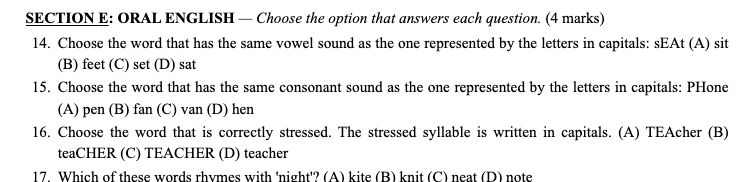
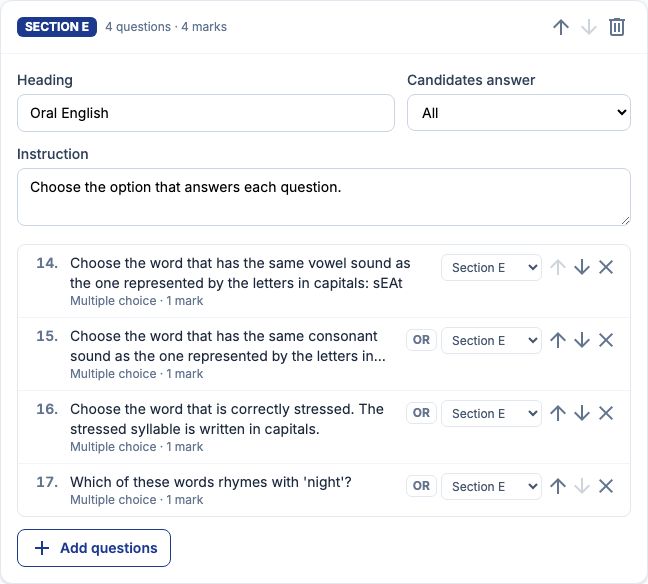
Write these as Multiple choice questions. As there is no underlining, show the sound being tested in CAPITALS inside the word — sEAt for the vowel, PHone for the consonant — and say so in the question: Choose the word that has the same vowel sound as the one represented by the letters in capitals: sEAt. For stress, write the stressed syllable in capitals in each option — TEAcher, teaCHER — and say so in the question; an option is never hyphenated, so a capitalised syllable always prints whole. For rhymes, put the word in quotes: Which of these words rhymes with 'night'? To put the tested word on a line of its own, press Enter before it when writing the question — line breaks print as typed.
Poems, extracts and tables
For Literature, or a language paper with a poem, add the poem on the Passages page with its "Kind" set to a poem: its lines and indents print exactly as typed, set in from the margin, and are not run together. An extract from a set text prints like a passage. For a table of data (a timetable, a price list), choose the data kind and line the columns up with spaces; printed from the print page it uses an even-width type so the columns stay straight.
Numbering the sections
By default the paper numbers straight through — 1 to 6 in Section A, 7 to 9 in Section B, and so on — and the passage's line names the right numbers. Many schools number each section from 1 instead: tick "Start numbering again at 1 in each section" under "Paper details".
Checklist: the right formatting every time
Objectives and oral English: Multiple choice, sentence only in the question, words only in the options, gaps as dots or underscores, tested words or sounds in CAPITALS. Fill in the blank: type the gap where it belongs. Comprehension and summary: the passage on the Passages page, each question Theory, several asks as one question with parts, every question linked to its passage, added with "Add all questions on this passage" and kept together. Essays and letters: one Theory question per topic at the full mark, "Candidates answer" set to "Any" 1. Every question: approved, with the paper's class, term and assessment, and a topic naming its section.
Still stuck?
Email info@tocel.ng and tell us which guide you were following.