Journals, the Ledger and Posting
Post and correct manual journals, read any account's ledger and the trial balance, and keep the automatic postings from fees, payments and other sources flowing.
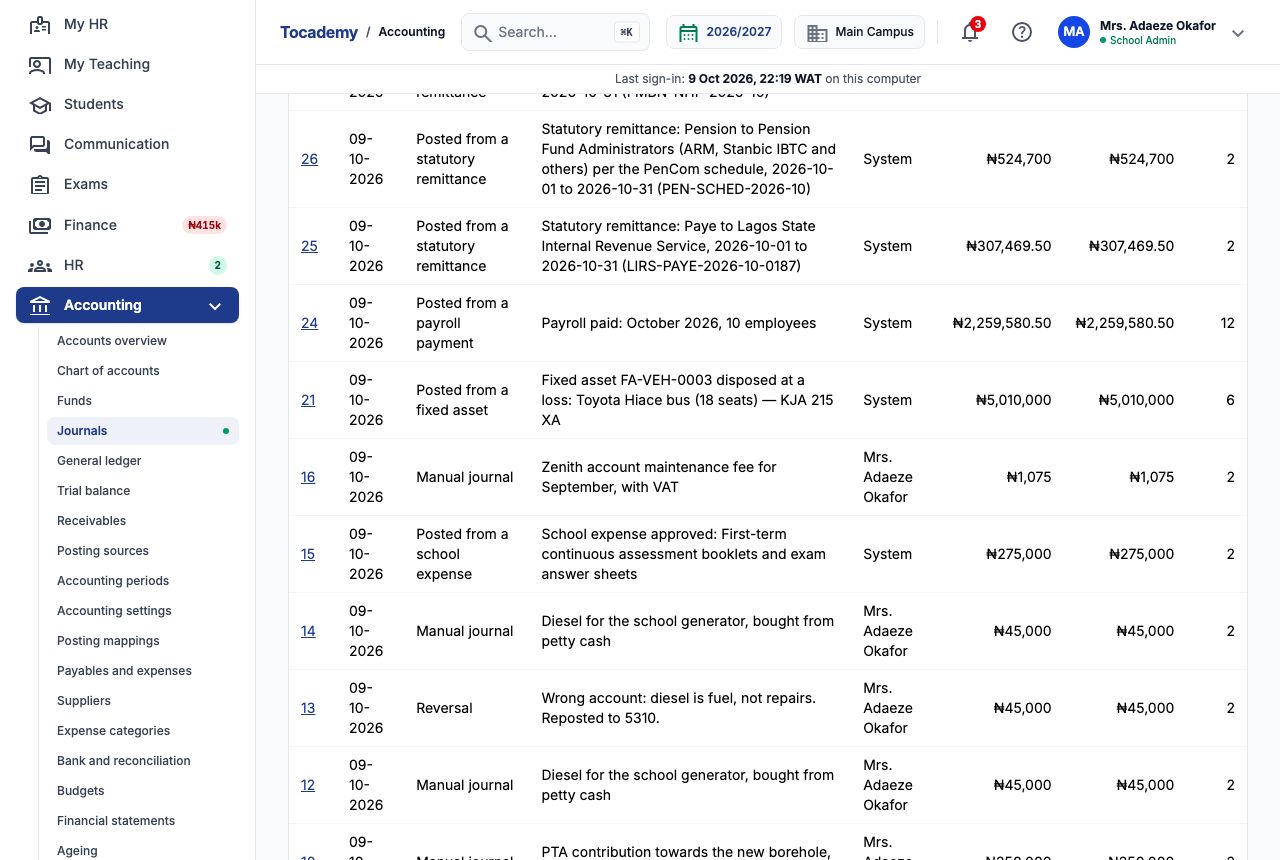
1. The journal: every entry, newest first
Accounting → Journals lists every entry in the books, newest first, with its number, date, kind, memo, who posted it, its debits and credits, and how many lines it has. There are three kinds. "Manual journal" is one somebody typed. An entry the school's own transactions made by themselves says what made it, such as "Posted from an invoice issued" or "Posted from a payment received", and the poster is System. "Reversal" is an entry that cancels an earlier one. Narrow the list with "From", "To" and "Kind" (Manual, Posted, Reversal or "Any") and press "Show". Click an entry's number to open it and see every line.
2. When to post a manual journal, and when not to
Most of the books fill themselves. Fee bills, counter and online payments, refunds, the school's subscription bill, SMS units, staff expense claims and staff loans all post on their own (see section 9). A manual journal is for money the system cannot see: a PTA donation paid straight into the bank, an opening balance, cash spent from a float, or moving an amount between accounts on your accountant's advice. Do not use a journal to change what a family owes. A discount, waiver or correction to a fee bill belongs in Finance on the invoice itself, so that the family's bill and the books keep telling the same story.
3. Example: record the PTA's ₦250,000 borehole contribution
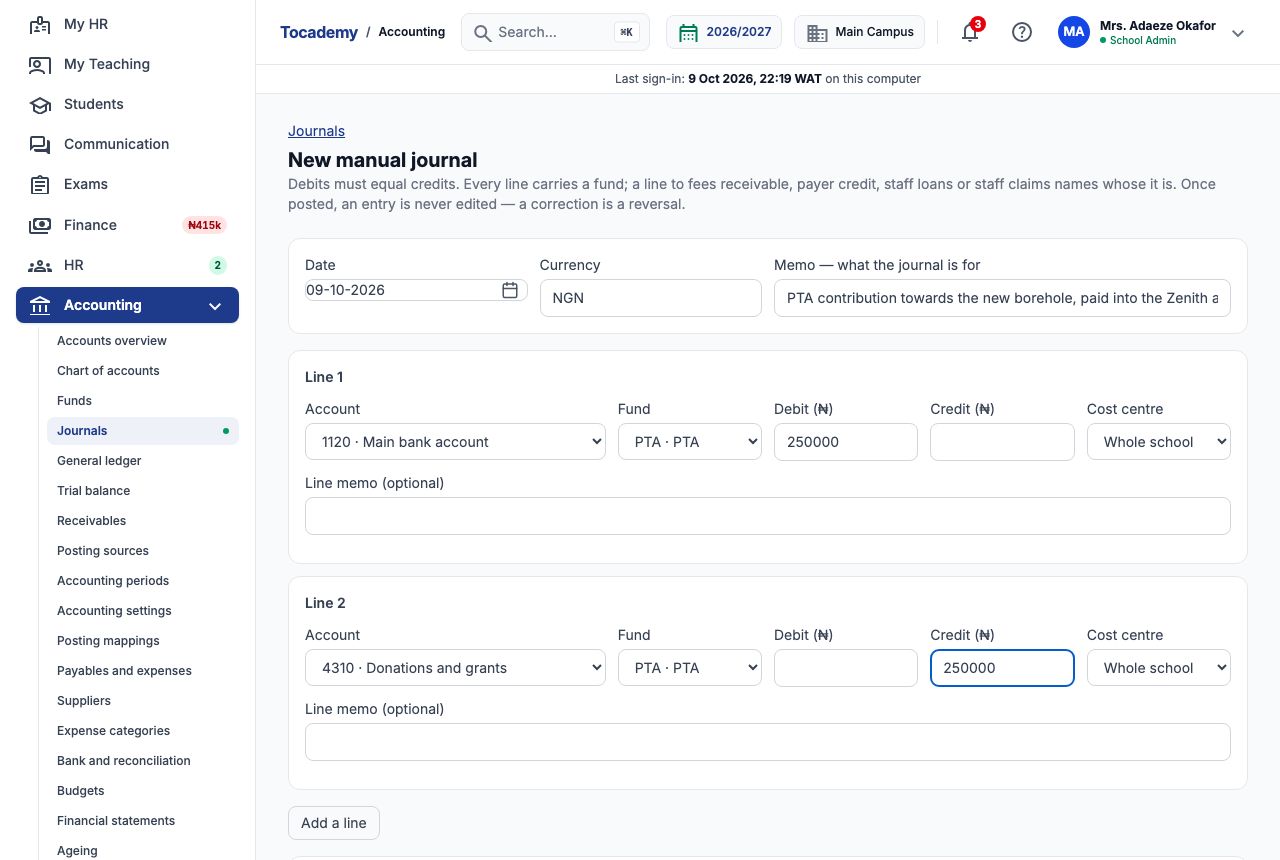
On 9 October the PTA paid ₦250,000 into the school's Zenith account towards a new borehole. The bursar opened Accounting → Journals and chose "New manual journal". She left "Date" on today and "Currency" on NGN, and typed in "Memo — what the journal is for": PTA contribution towards the new borehole, paid into the Zenith account. On Line 1 she chose "Account" 1120 · Main bank account and "Fund" PTA · PTA, and typed 250000 in "Debit (₦)": the bank now holds ₦250,000 more. On Line 2 she chose 4310 · Donations and grants, fund PTA · PTA, and typed 250000 in "Credit (₦)": the school has earned ₦250,000 of donation income. Both lines name the PTA fund, because the money was given for a stated purpose. "Cost centre" can name a campus; she left it on "Whole school".
4. The running total stops an unbalanced journal
Below the lines, the page keeps a running total of debits and credits. If they differ, it shows how far out they are and says debits and credits must be equal, and "Post journal" stays greyed out. In this picture the bursar had typed ₦45,000 on one side and ₦40,000 on the other, so the journal is out by ₦5,000. Fix the figure and the button comes back. Press "Add a line" for a journal with more than two lines (for example one payment split across three expense accounts), and "Remove line" to drop one. Every line needs an account and a fund, and an amount on one side only. The date must fall in an open period.

5. Post it
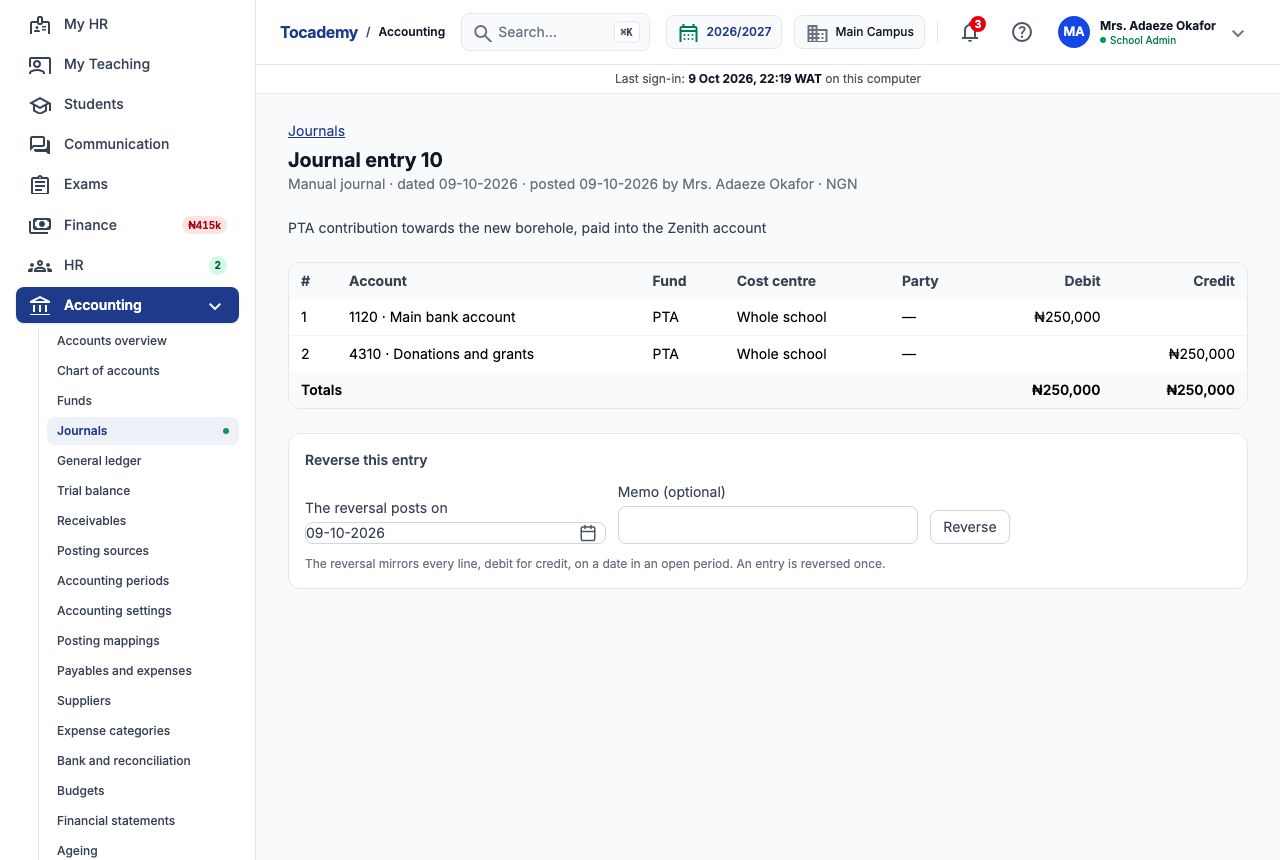
With both sides at ₦250,000, the bursar pressed "Post journal". The page opened the new entry, said Posted, and listed its two lines with the fund on each. The heading shows the entry's number, its kind (Manual journal), the date it is dated, the date it was posted, and who posted it. That entry is now permanent: nobody can edit or delete it. It also appears in the audit trail with her name.
6. Lines that must name a pupil or staff member
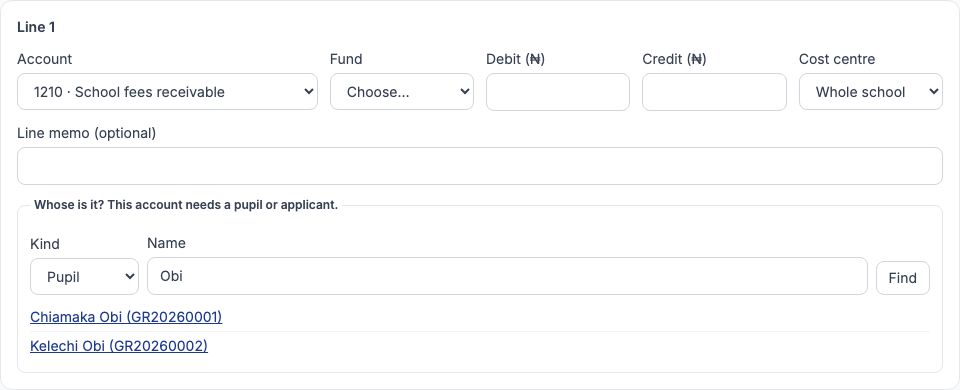
Some accounts track what a particular person owes or is owed: 1210 School fees receivable and 2120 Fees paid in advance (payer credit) belong to a pupil or applicant, and 1220 Staff loans and advances and 2130 Staff claims payable to a staff member. When a line uses one of these, a box asks whose it is. Choose the kind, type at least two letters of the name in "Name" and press "Find". Click the right person from the list and the line is filed against them. Press "Change" to pick someone else. The search matches the start of a word in the name, so Obi finds Chiamaka Obi and Kelechi Obi, each with their admission number so you pick the right child, and not Tobiloba Adewale. Remember the warning in section 2: fee changes belong on the invoice in Finance.
7. Example: correct a mistake with a reversal
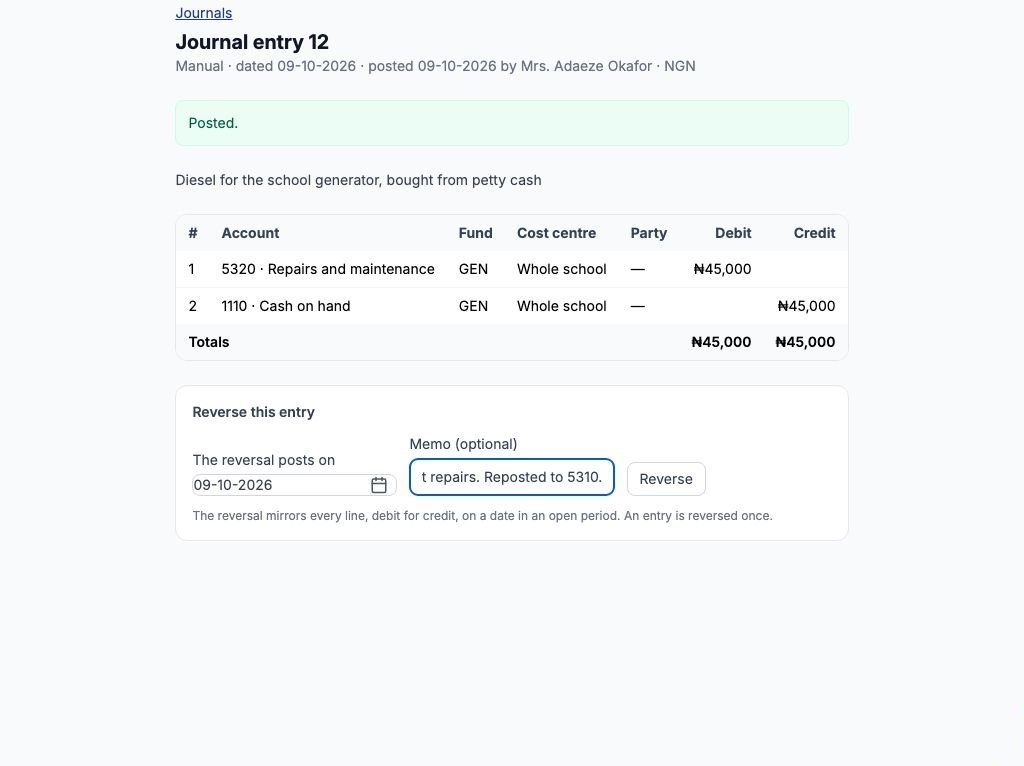
The bursar bought ₦45,000 of diesel for the generator from petty cash and journalled it: debit 5320 Repairs and maintenance ₦45,000, credit 1110 Cash on hand ₦45,000. That became entry 12. Diesel is fuel, not repairs, so the account was wrong. An entry is never edited, so she opened entry 12. Under "Reverse this entry" she left "The reversal posts on" as today, typed in "Memo (optional)" Wrong account: diesel is fuel, not repairs. Reposted to 5310, and pressed "Reverse". The reversal must be dated in an open period, and an entry can be reversed only once. Only a manual journal offers "Reverse this entry": an entry posted automatically is corrected in the record it came from (voiding an invoice posts its reversal), and a reversal is not reversed again — post a new journal instead.
8. What the reversal does
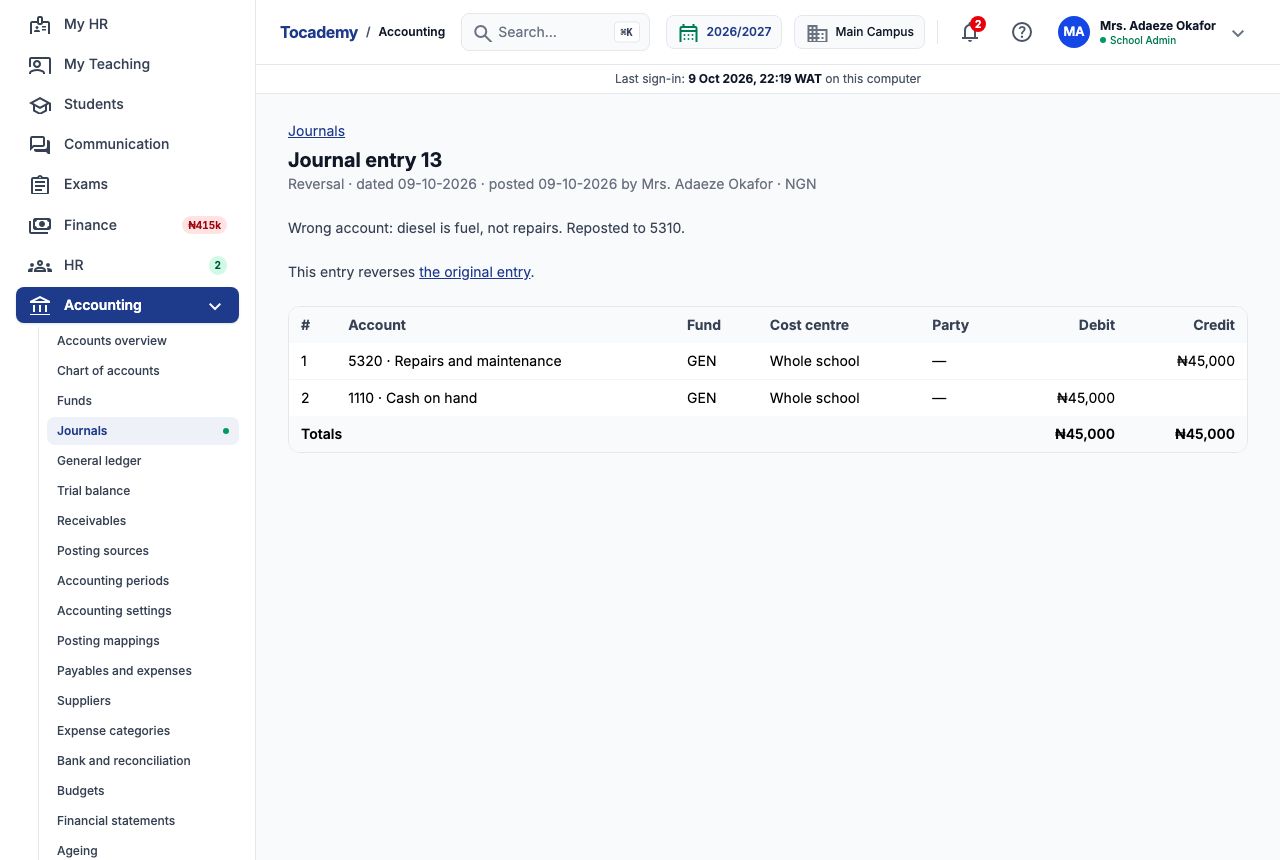
The reversal, entry 13, mirrors every line of the original debit for credit: credit 5320 Repairs and maintenance ₦45,000, debit 1110 Cash on hand ₦45,000. Together, entries 12 and 13 come to nothing. The reversal links back to the original entry, and the original now links forward to its reversal, so anyone reading either one can see what happened. The bursar then posted a fresh journal, entry 14: debit 5310 Electricity, fuel and diesel ₦45,000, credit 1110 Cash on hand ₦45,000. The books show the mistake, its correction and the right entry, which is exactly what an auditor wants to see.
9. The general ledger: one account, line by line
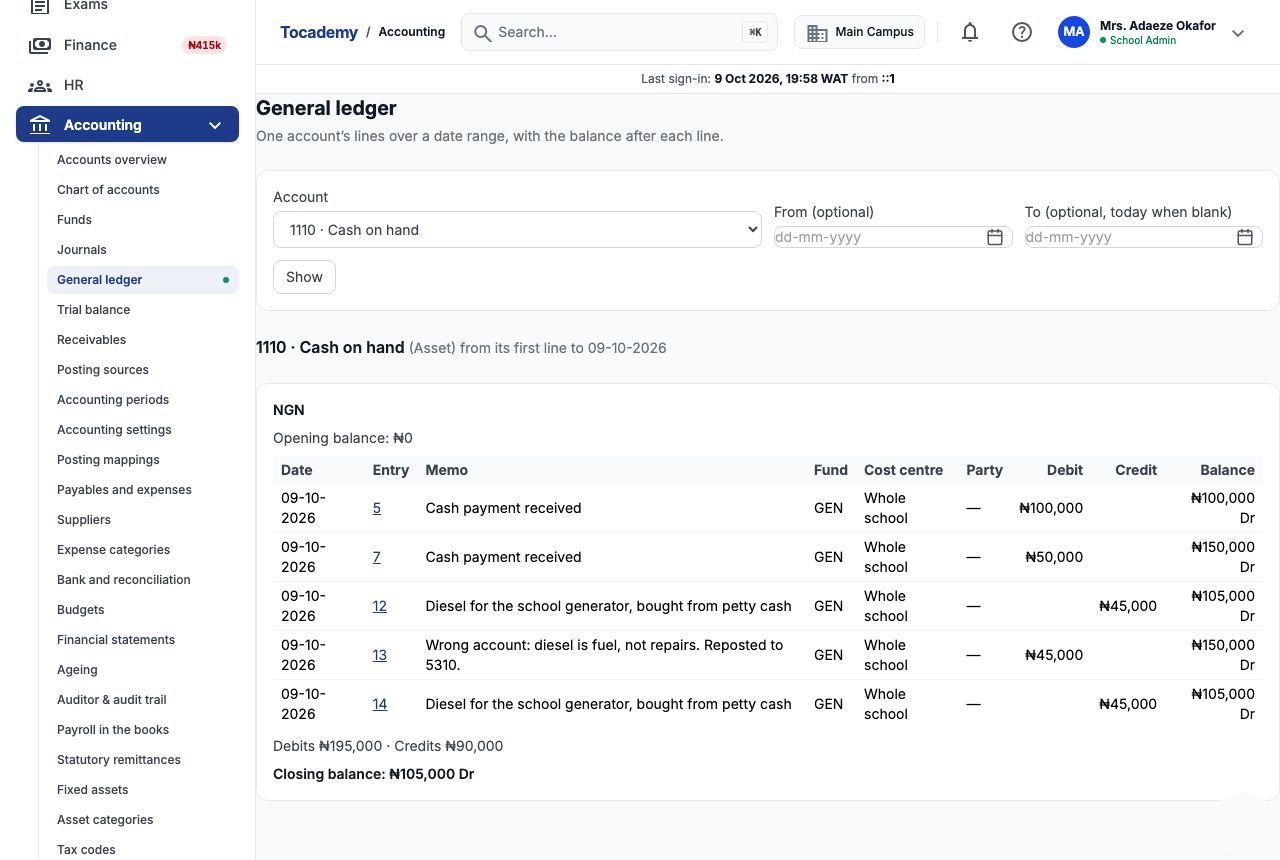
Accounting → General ledger shows every line in one account with the balance after each line. Choose the "Account", optionally set "From (optional)" and "To (optional, today when blank)", and press "Show". Greenfield's 1110 Cash on hand reads: opening balance ₦0. Then ₦100,000 debit (Mr. Ifeanyi Obi's cash part-payment for Chiamaka) brings it to ₦100,000 Dr, and ₦50,000 debit (Fatima Sani's cash payment) to ₦150,000 Dr. The ₦45,000 diesel credit takes it to ₦105,000 Dr, the reversal's ₦45,000 debit back to ₦150,000 Dr, and the corrected diesel journal to ₦105,000 Dr. Closing balance: ₦105,000 Dr, which is what should be in the till. Dr means the balance is on the debit side, which for cash means money held. Each entry number links to the full entry.
10. The trial balance
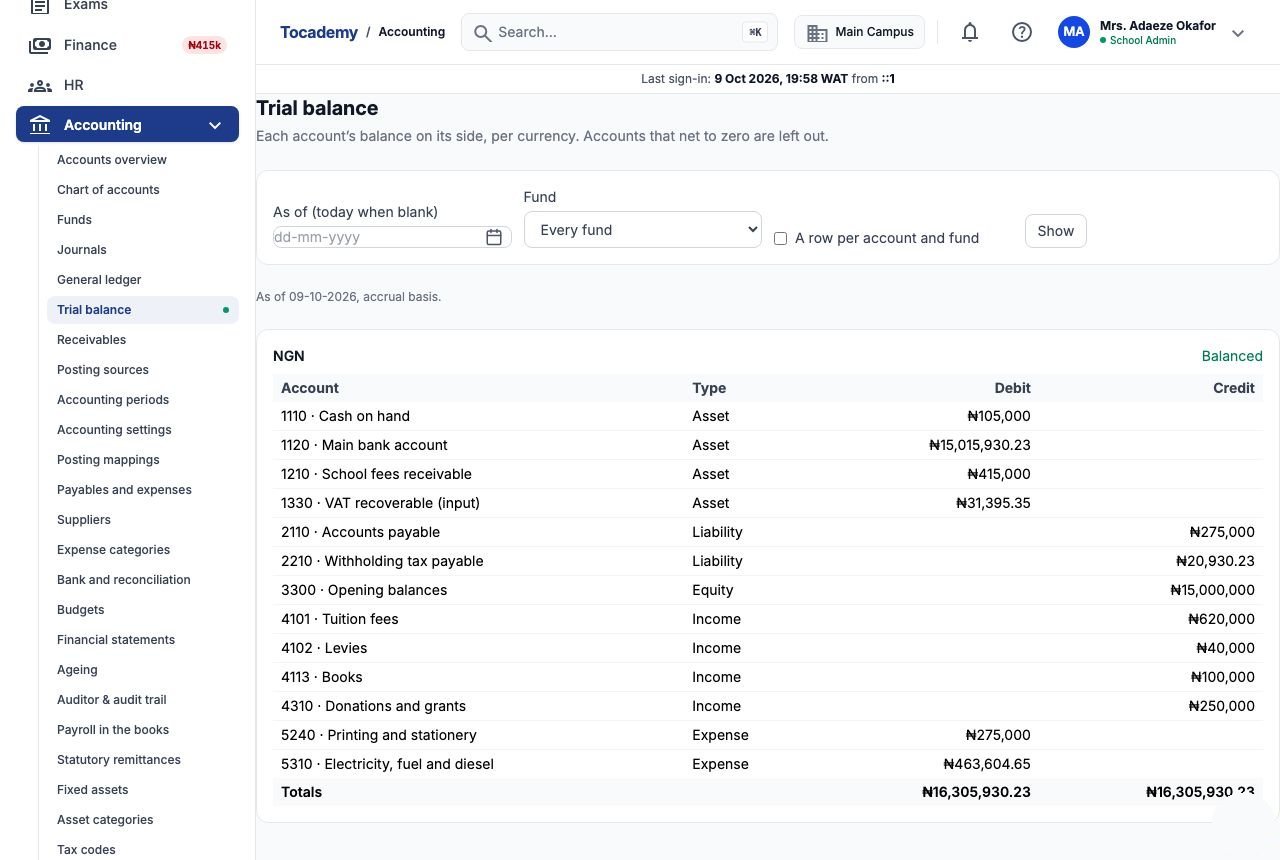
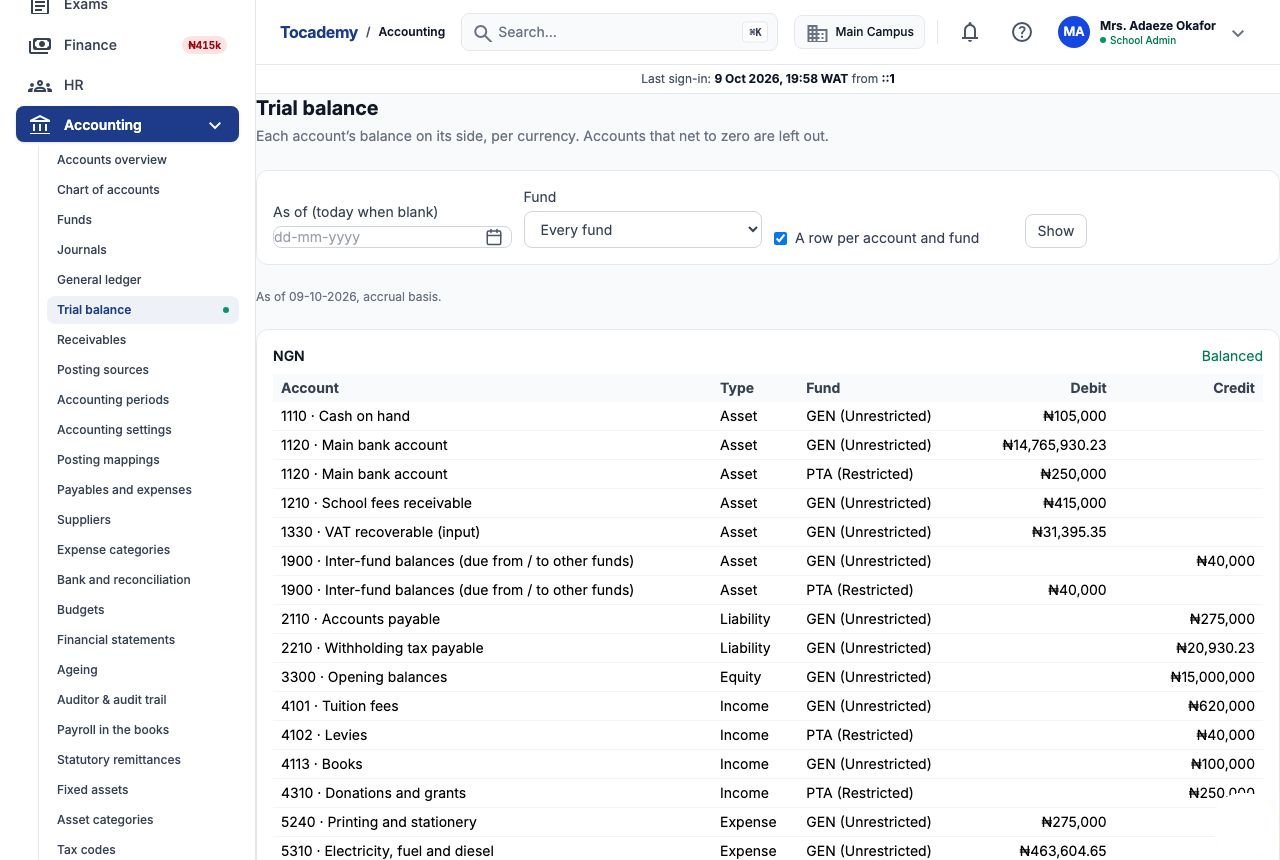
Accounting → Trial balance lists every account's balance on its own side, as of a date ("As of (today when blank)"). Accounts that net to zero are left out. The totals of the two columns must be equal, and the page says "Balanced" when they are. If you ever see "Does not balance" for the whole school, tell your support contact at once: it should not happen. Each currency gets its own section and its own totals, because naira and dollars are never added together. In Greenfield's trial balance, 1210 School fees receivable reads ₦415,000 (what pupils still owe), 1110 Cash on hand ₦105,000, 4101 Tuition fees ₦620,000, 4113 Books ₦100,000 and 4310 Donations and grants ₦250,000. 5320 Repairs and maintenance is missing: the diesel journal and its reversal cancelled out.
11. The trial balance by fund
Tick "A row per account and fund" and press "Show" to split each account by fund, with each fund's restriction beside it. This is how a proprietor or PTA chairman sees restricted money on its own. Greenfield's 1120 Main bank account now shows two rows: one in GEN (Unrestricted) and ₦250,000 in PTA (Restricted), which is the borehole money. 4102 Levies shows ₦40,000 in the PTA fund: the ₦10,000 PTA levy on each of four pupils' bills. You will also see 1900 Inter-fund balances, ₦40,000 debit in PTA and ₦40,000 credit in GEN. That pair records that the families' levy is owed into the general fund's receivable but belongs to the PTA, so each fund's own books still balance. To read one fund alone, pick it under "Fund" instead of "Every fund". One fund on its own may not balance, and the page says so rather than hiding it.
12. Posting sources: what fills the books by itself
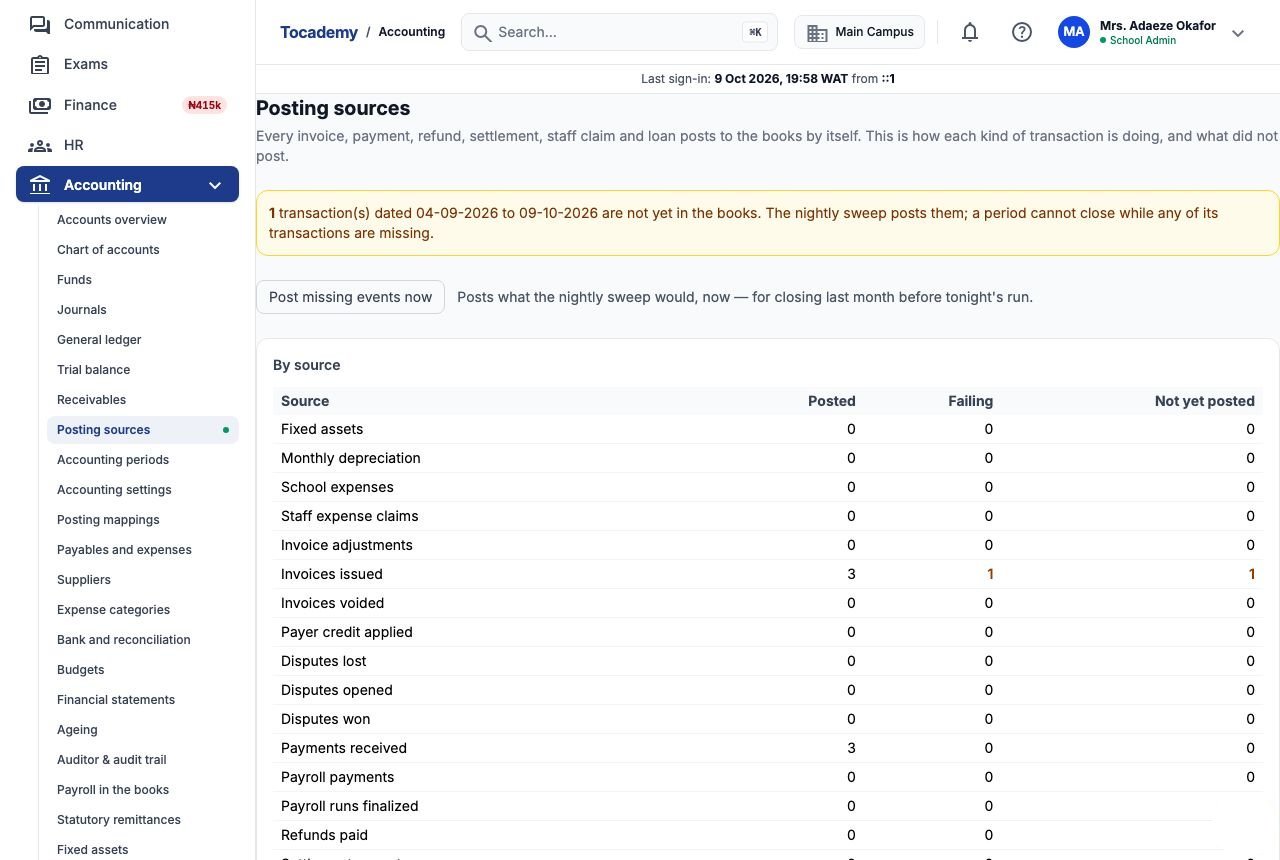
Accounting → Posting sources shows how each kind of transaction is reaching the books. The table lists every source with how many have posted, how many are failing, and how many are not yet posted. The sources are: invoices issued, voided and adjusted; payments received; payer credit applied; refunds paid; disputes opened, won and lost; settlement payouts and transaction charges; the Tocademy subscription bills; SMS units bought and SMS units used each month; staff expense claims and staff loans; school expenses; payroll runs and payments; statutory remittances; fixed assets and monthly depreciation. The banner above it checks the last few weeks. If any transaction in that window has not reached the books, it says how many, and reminds you a period cannot close while any of its transactions are missing.
13. Example: an invoice that could not post
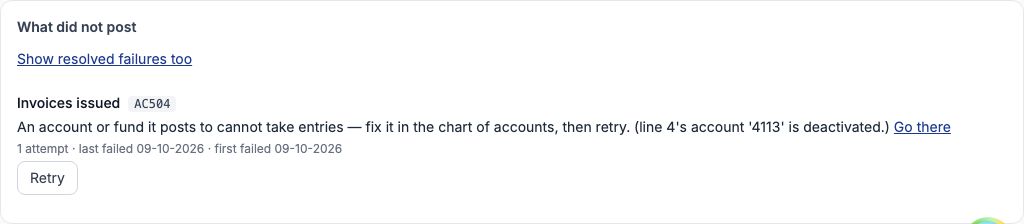
Tobiloba Adewale's first-term bill, INV-2026-000001 for ₦185,000, was raised while the bursar had switched off 4113 Books in the chart of accounts. The bill was issued in Finance as normal, but its books line had nowhere to go, so it did not post. Under "What did not post" it shows as Invoices issued with the code AC504, the reason in words (an account or fund it posts to cannot take entries; line 4's account '4113' is deactivated), how many attempts were made, and when. "Go there" takes you to the screen where it is fixed. Other reasons you may see are a fee category with no mapping (fix it in Posting mappings) and a date in a closed period (AC503; reopen the period under Accounting periods). Until it posts, Tobiloba's ₦185,000 is missing from fees receivable.
14. Fix the cause, then retry
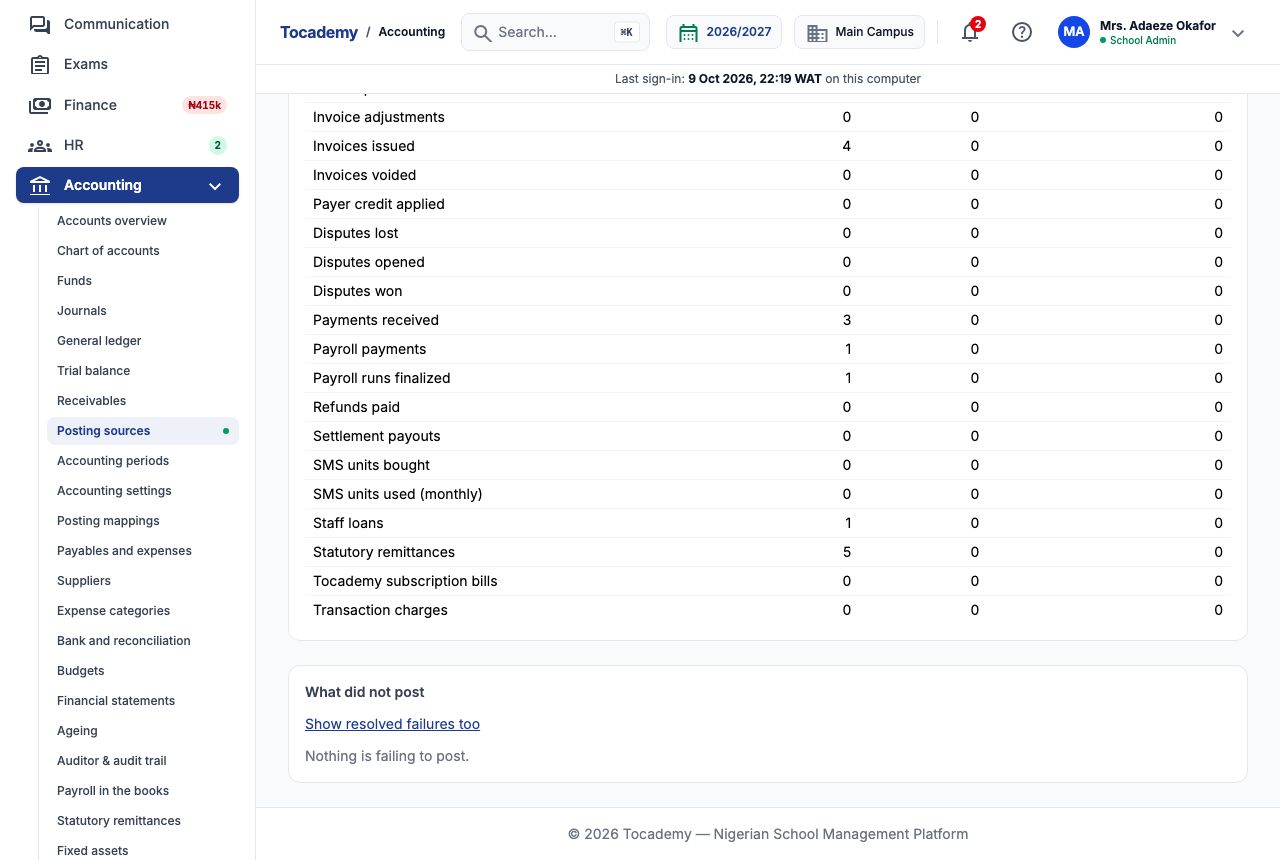
The bursar opened the chart of accounts, opened 4113 Books and pressed "Activate". Back on Posting sources she pressed "Retry" beside the failure. The page said it posted: the entry is in the journal and the failure is resolved. Invoices issued now reads four posted and none failing, and receivables gained Tobiloba's ₦185,000. If a retry fails again, the page says so and the reason stays in the register; fix the cause and try again. A retry never posts twice, so pressing it again is safe. Pick "Show resolved failures too" to see failures that have since been put right. A failure whose original record has since been deleted is listed under "Source no longer exists"; it can never post and does not hold up a close.
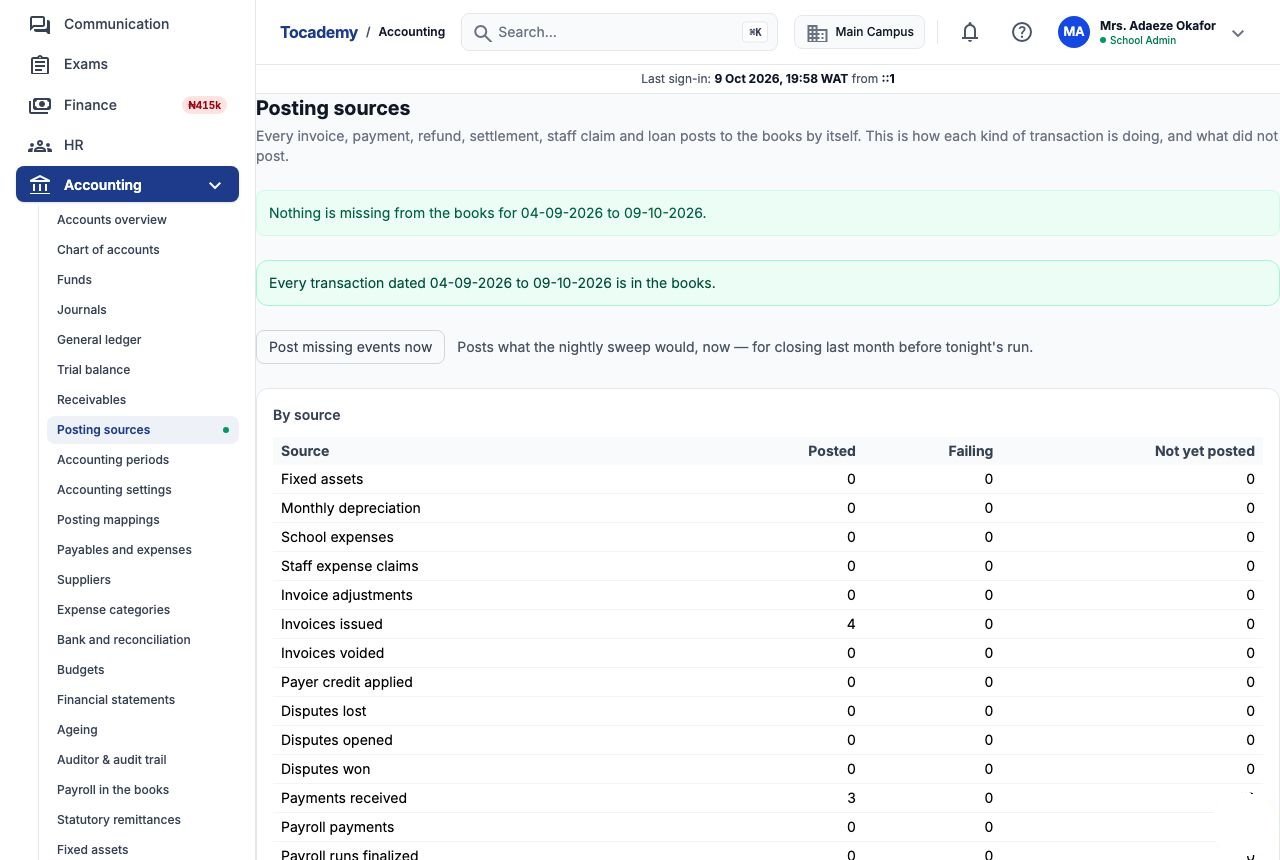
15. Post missing events now
Every night the system sweeps the last few weeks for any transaction that has not reached the books and posts it. If you want to close last month before tonight's sweep, press "Post missing events now" to do the same thing straight away. When Greenfield pressed it, the page said nothing is missing from the books for 04-09-2026 to 09-10-2026, and the banner turned green. Anything that cannot post goes to the failure register as described above.
16. Bring in history from before the books existed
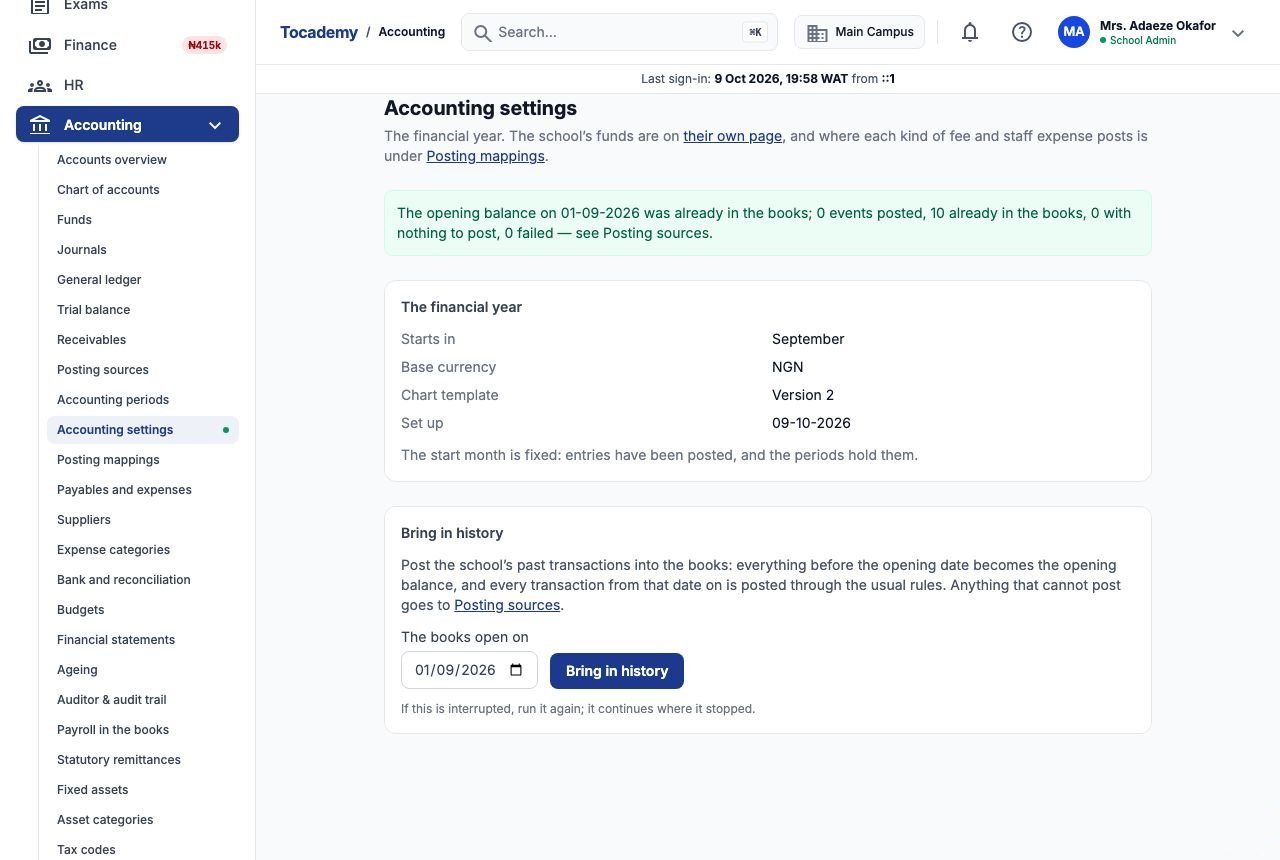
A school that has been taking fees for a while can bring that history into the books. Go to Accounting → Accounting settings, set "The books open on" to the date you want the books to start, and press "Bring in history". Everything before that date becomes one opening balance, and every transaction from that date on is posted through the usual rules. The page then says in words what happened. When Greenfield brought in history from 01-09-2026, it reported 0 events posted and 10 already in the books, because its bills and payments had already posted by themselves. Nothing is ever posted twice. If the run is interrupted, run it again; it continues where it stopped. Anything that cannot post goes to Posting sources. This needs the "Manage accounting settings" permission.
17. The audit trail: who did what to the books
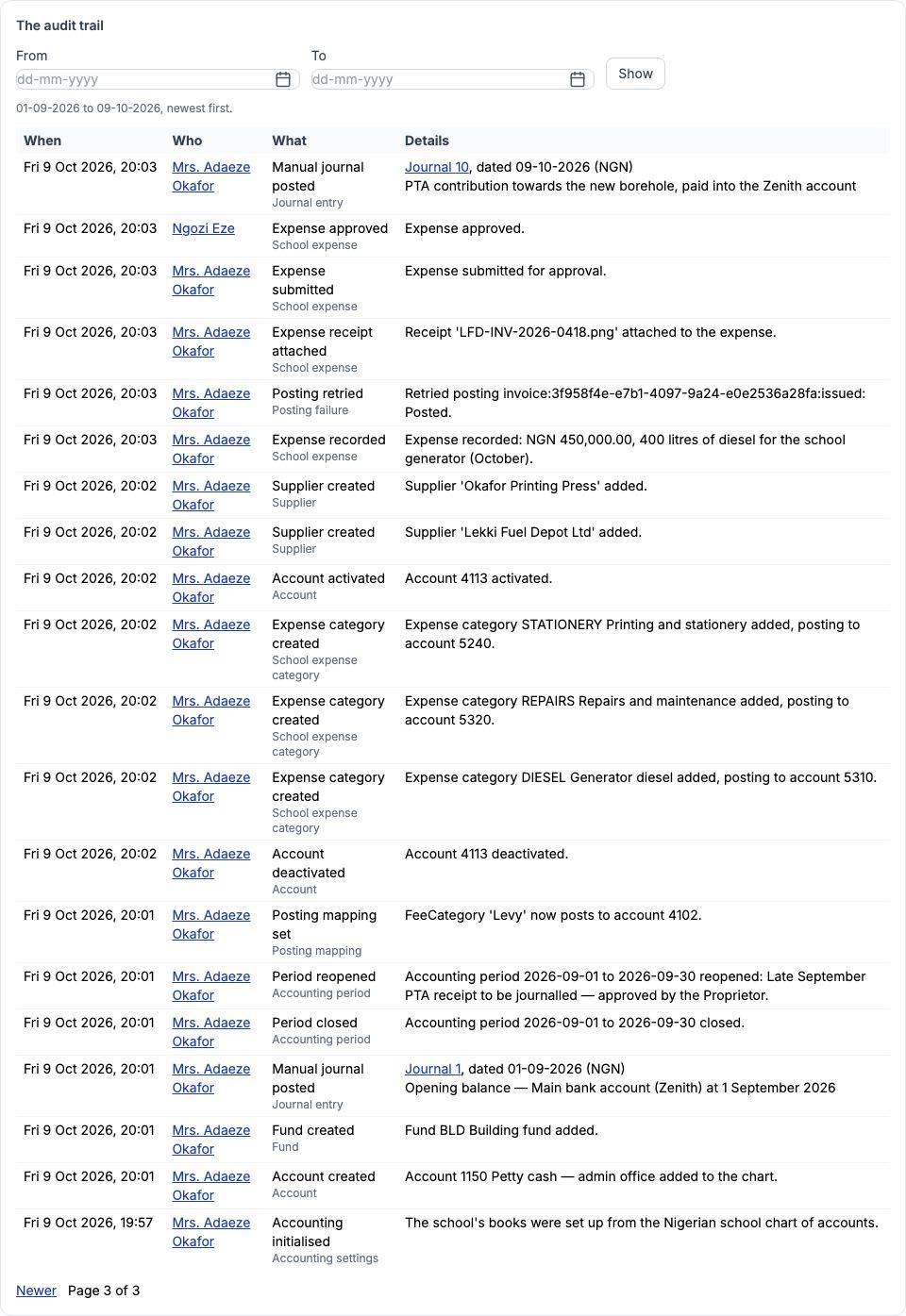
Accounting → Auditor & audit trail ends with "The audit trail", a record of every act on the books, newest first. Each row has when it happened, who did it, what they did and the details. Greenfield's shows its manual journals and the diesel reversal, each linked to its entry, and the history run (0 posted, 0 failed). It also shows the retry of Tobiloba's invoice, 4113 being activated again, and the September reopening with its reason. The newest acts come first, so choose "Older" to page back to earlier ones. Narrow it with "From" and "To" and press "Show", or click a person's name to see only what they did. The top of the same page downloads the auditor's export, which has its own guide.
Still stuck?
Email info@tocel.ng and tell us which guide you were following.