Training and Professional Development
Keep a catalogue of the training your school offers, assign it to staff, record when they complete it, track CPD credits and renewals, and let every member of staff see their own training.
1. The training programmes
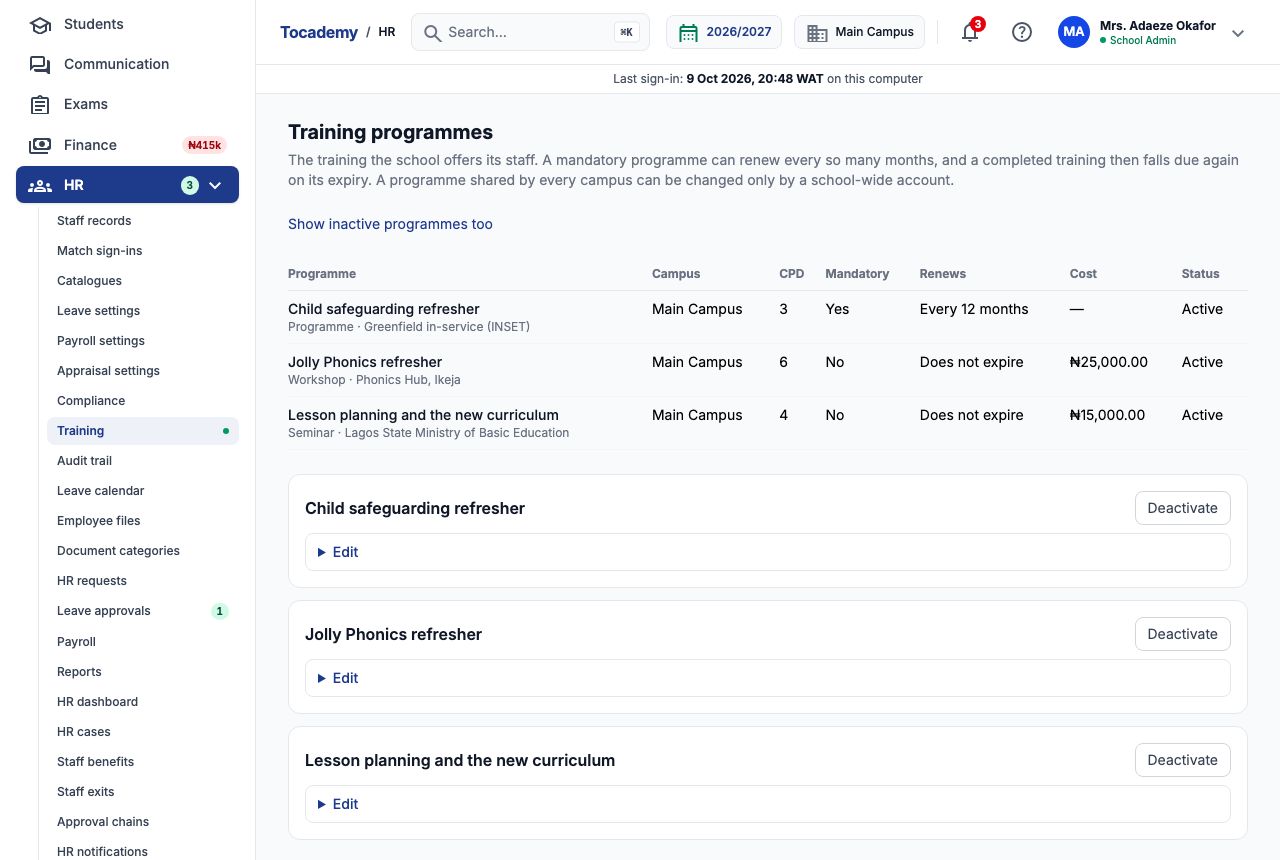
Choose "Training" in the HR menu to open "Training programmes": the courses, workshops, seminars, conferences, certifications and other professional development the school offers its staff. Each programme carries its CPD credits, whether it is mandatory, how often it renews, its provider and its cost. Programmes are a catalogue — nobody is enrolled until you assign a programme to someone on their staff record (step 5). Greenfield Model College counts one CPD credit per hour of training, so a six-hour workshop carries 6 credits.
2. Add a programme
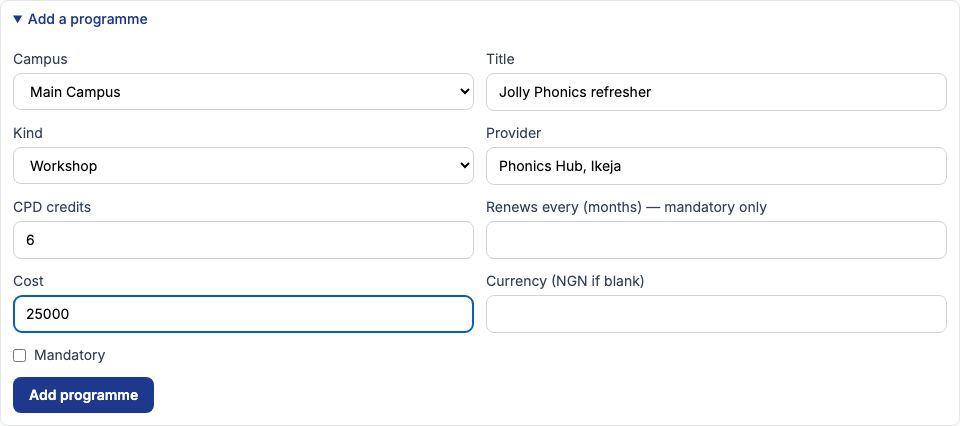
Open "Add a programme" at the bottom of the page. Choose the "Campus" (or "Shared by every campus" from a school-wide account), type the "Title", choose the "Kind" and fill in the "Provider", "CPD credits" and "Cost" ("Currency (NGN if blank)" can stay empty for naira). Greenfield added "Jolly Phonics refresher", a Workshop run by Phonics Hub, Ikeja, worth 6 CPD credits at ₦25,000 per teacher, not mandatory. Press "Add programme". The form empties once the programme is added, ready for the next one.
3. Mandatory training that renews
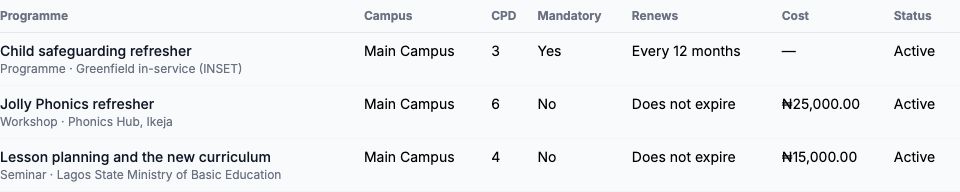
Tick "Mandatory" for training every member of staff it is assigned to must complete, and fill in "Renews every (months) — mandatory only" if it has to be repeated. A completed mandatory training then expires that many months after its completion date and falls due again. Greenfield added "Child safeguarding refresher", a Programme run at its own in-service (INSET) day, 3 CPD credits, mandatory, renewing every 12 months, with no cost. It also added "Lesson planning and the new curriculum", a Seminar from the Lagos State Ministry of Basic Education, 4 credits at ₦15,000. The table shows "Every 12 months" or "Does not expire" for each.
4. Change or retire a programme
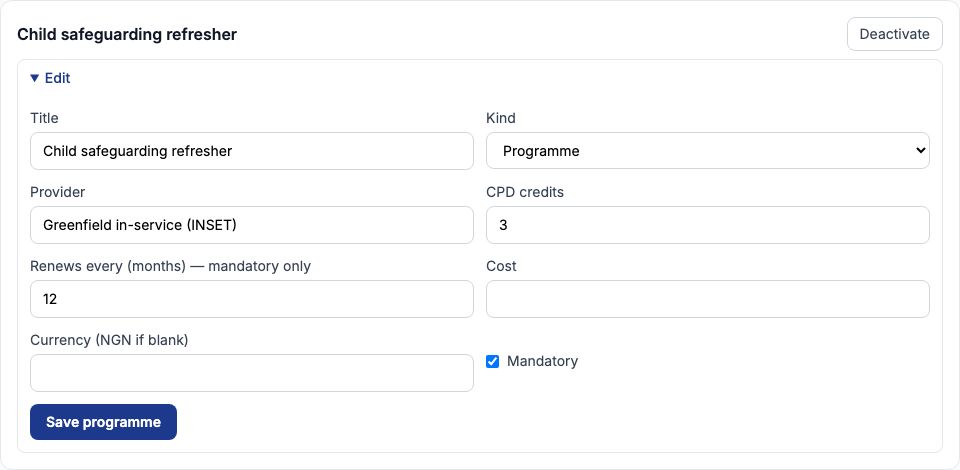
Each programme has its own card below the table. Open "Edit" to change its title, kind, provider, credits, renewal, cost or whether it is mandatory, and press "Save programme". Training already assigned keeps the terms it was assigned under, so raising a programme's cost or credits does not rewrite last term's records. A programme you no longer run is retired with "Deactivate": it is no longer offered when assigning training, and what was already recorded keeps it. "Show inactive programmes too" lists retired ones, each with "Reactivate".
5. Example: enrol three teachers on the Jolly Phonics refresher
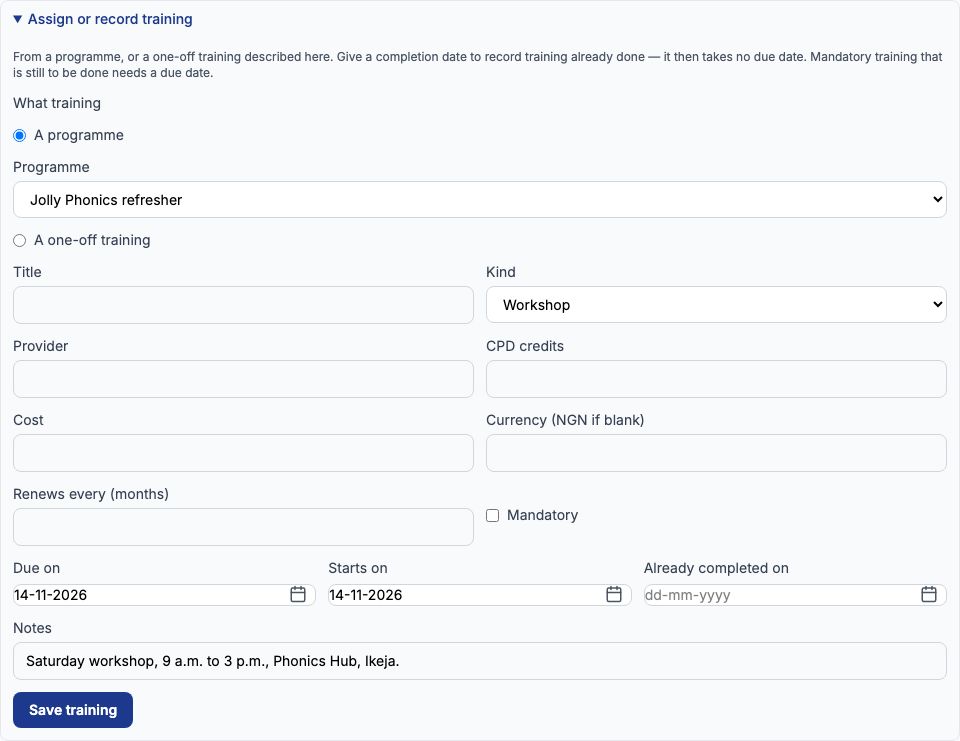
Training is assigned on each employee's staff record, on the "Training" tab. Funmilayo Adeyemi, Ngozi Okonkwo and Aisha Bello are to attend the Jolly Phonics refresher on Saturday 14-11-2026. On Funmilayo's Training tab open "Assign or record training", leave "A programme" selected and choose "Jolly Phonics refresher" in "Programme". Set "Due on" and "Starts on" to 14-11-2026, add a note such as the venue and times, and press "Save training". Do the same on Ngozi's and Aisha's records. The three places cost the school 3 × ₦25,000 = ₦75,000. For something that is not in the catalogue — a one-day course a teacher found herself — choose "A one-off training" instead and describe it in the fields below.
6. Record training that has already happened
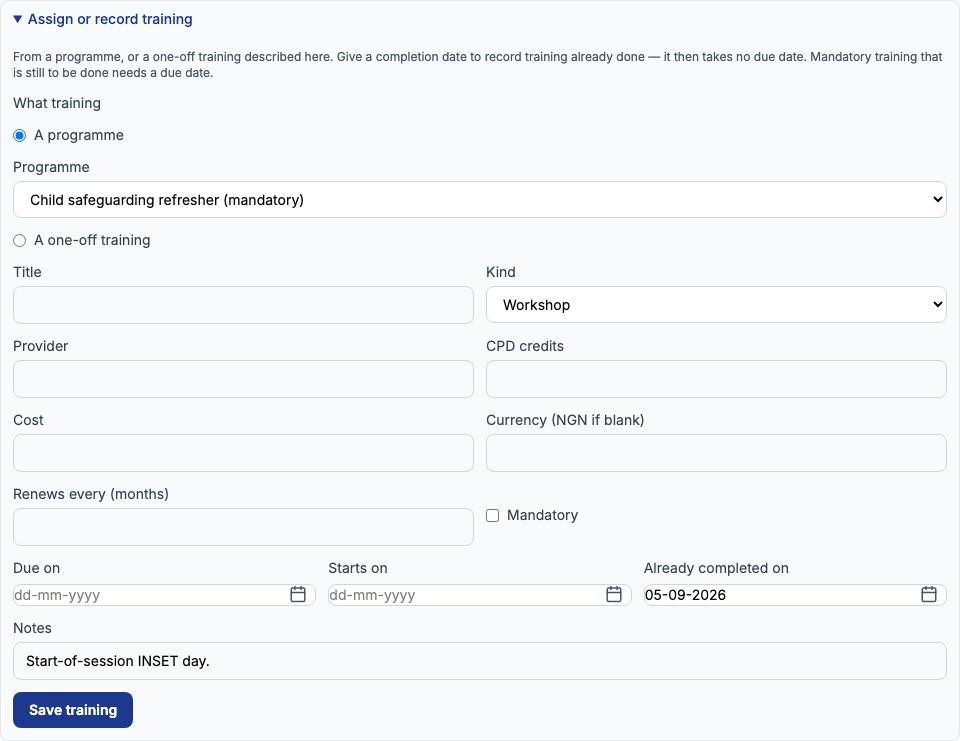
The same form records past training in one step: fill in "Already completed on" instead of a due date. Greenfield's three teachers attended the Child safeguarding refresher at the start-of-session INSET day, so on each record we chose "Child safeguarding refresher (mandatory)", set "Already completed on" to 05-09-2026 and pressed "Save training". Because the programme renews every 12 months, Tocademy works out the expiry itself: 5 September 2027. Mandatory training that is still to be done must have a due date.
7. The Training tab
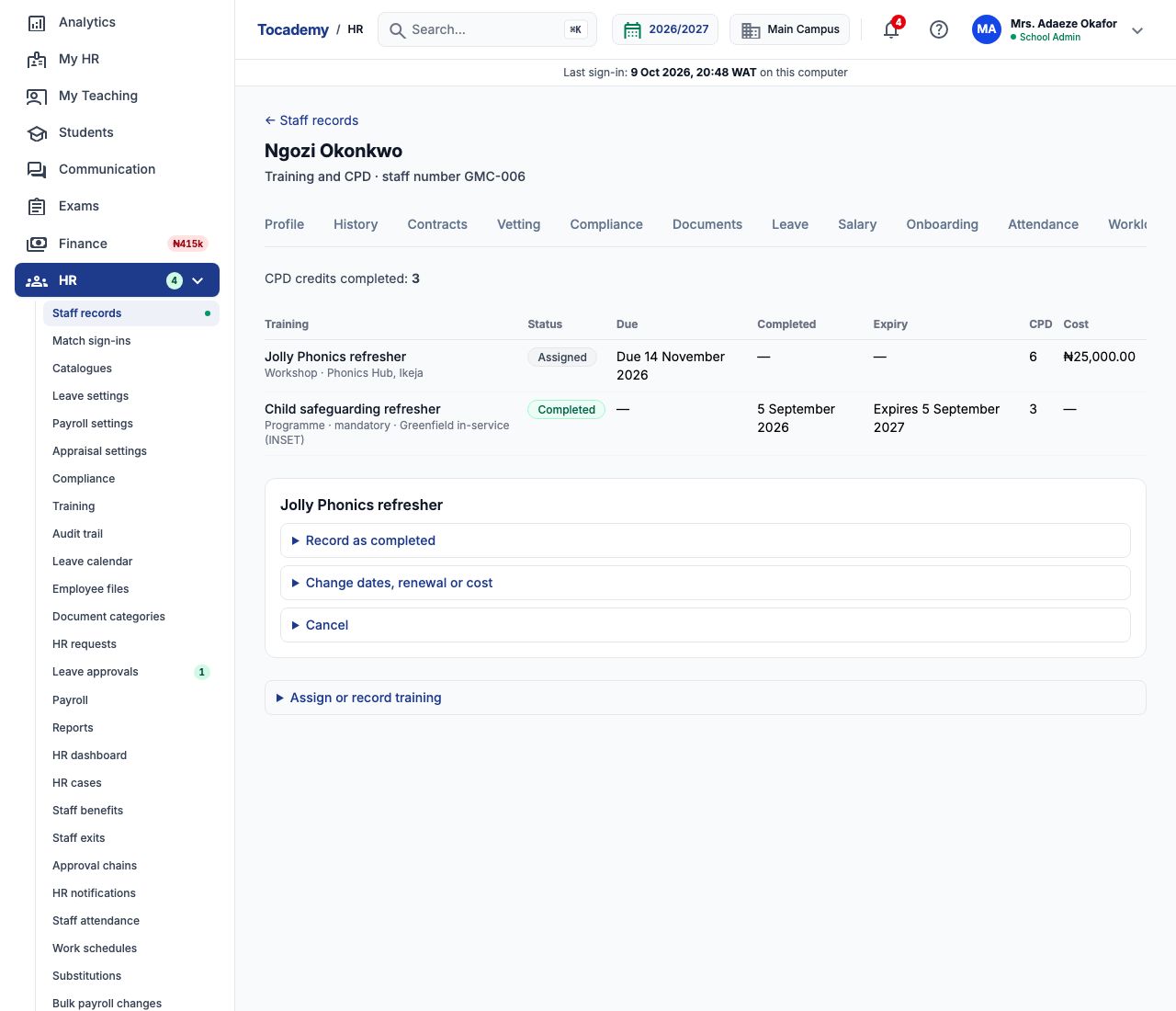
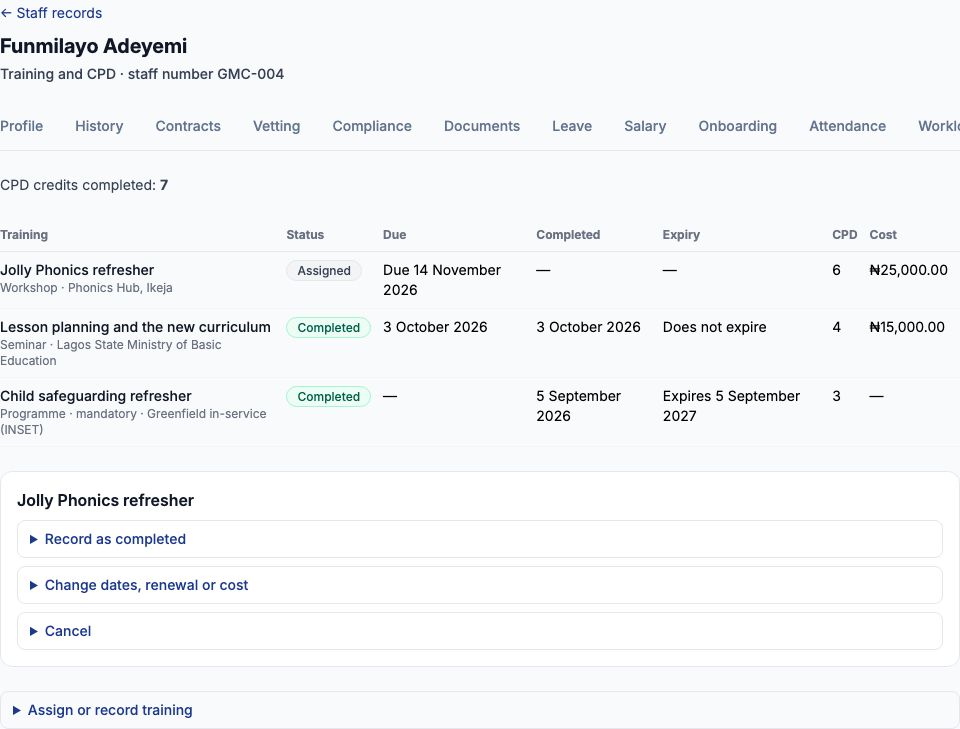
The tab lists every training on the record with its "Status" (Assigned, Completed or Cancelled), "Due", "Completed", "Expiry", "CPD" credits and "Cost", and above the table "CPD credits completed". Dates are said in words — "Due 14 November 2026", "Expires 5 September 2027" — and change to "Overdue since" or "Lapsed" followed by the date once it has passed. Under the table each open training has three actions: "Record as completed", "Change dates, renewal or cost" and "Cancel".
8. Record attendance and completion
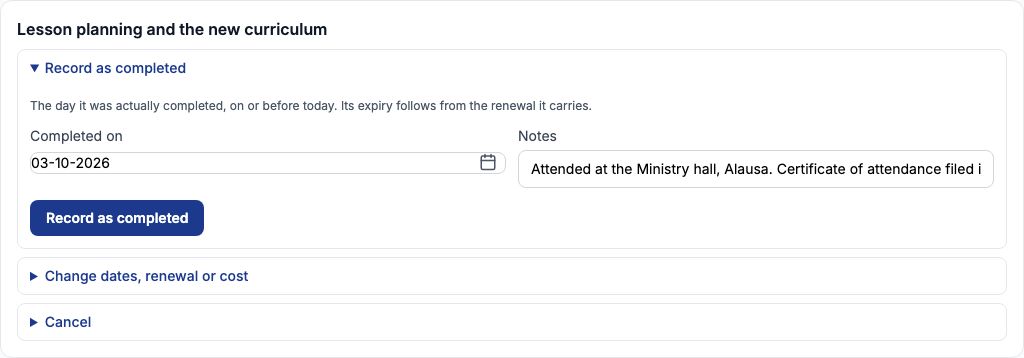
After the session, open "Record as completed" under the training, enter the day it actually happened in "Completed on", add any "Notes" (for example where the certificate of attendance is filed) and press "Record as completed". The date must be today or earlier: Tocademy will not accept a completion on a day that has not yet come, so the Jolly Phonics refresher is recorded on or after 14 November, not before. Funmilayo also attended the curriculum seminar on 03-10-2026, so HR recorded that one: "Completed on" 03-10-2026 with a note that her certificate is filed in her Documents. A teacher who missed the session is left as Assigned (and goes overdue) or cancelled, never marked complete.
9. CPD credits add up
Each completed training adds its credits to the employee's total. Funmilayo's "CPD credits completed" went from 3 (the safeguarding refresher) to 7 once the 4-credit seminar was recorded. When the Jolly Phonics refresher is recorded after 14 November it adds 6 more, taking her to 13, and Ngozi Okonkwo and Aisha Bello each go from 3 to 9. Assigned and cancelled training never counts towards the total.
10. Change, reschedule or cancel
If a session moves, open "Change dates, renewal or cost", change "Due on" or "Starts on" and press "Save changes" — everything in that form is saved as shown, so a field you empty is cleared, and mandatory training keeps a due date. If a teacher will not attend at all, open "Cancel", give the "Reason" (for example "On maternity leave from November") and press "Cancel training". A cancelled training stays on the record with its reason; a completed one can never be cancelled.
11. Expiry, renewals and certificates
Only mandatory training with a renewal period expires. When the safeguarding refresher reaches 5 September 2027 the Training tab shows it as lapsed and the training falls due again; assign the next session with a due date. Professional registrations and certifications with their own expiry dates — a TRCN registration, a First Aid at Work certificate, a driver's licence — are not training records: keep them on the staff record's Vetting and Compliance tabs, where their expiry dates are tracked. See the Vetting and Compliance guide. A certificate of attendance from a workshop can be filed on the employee's Documents tab.
12. What staff see
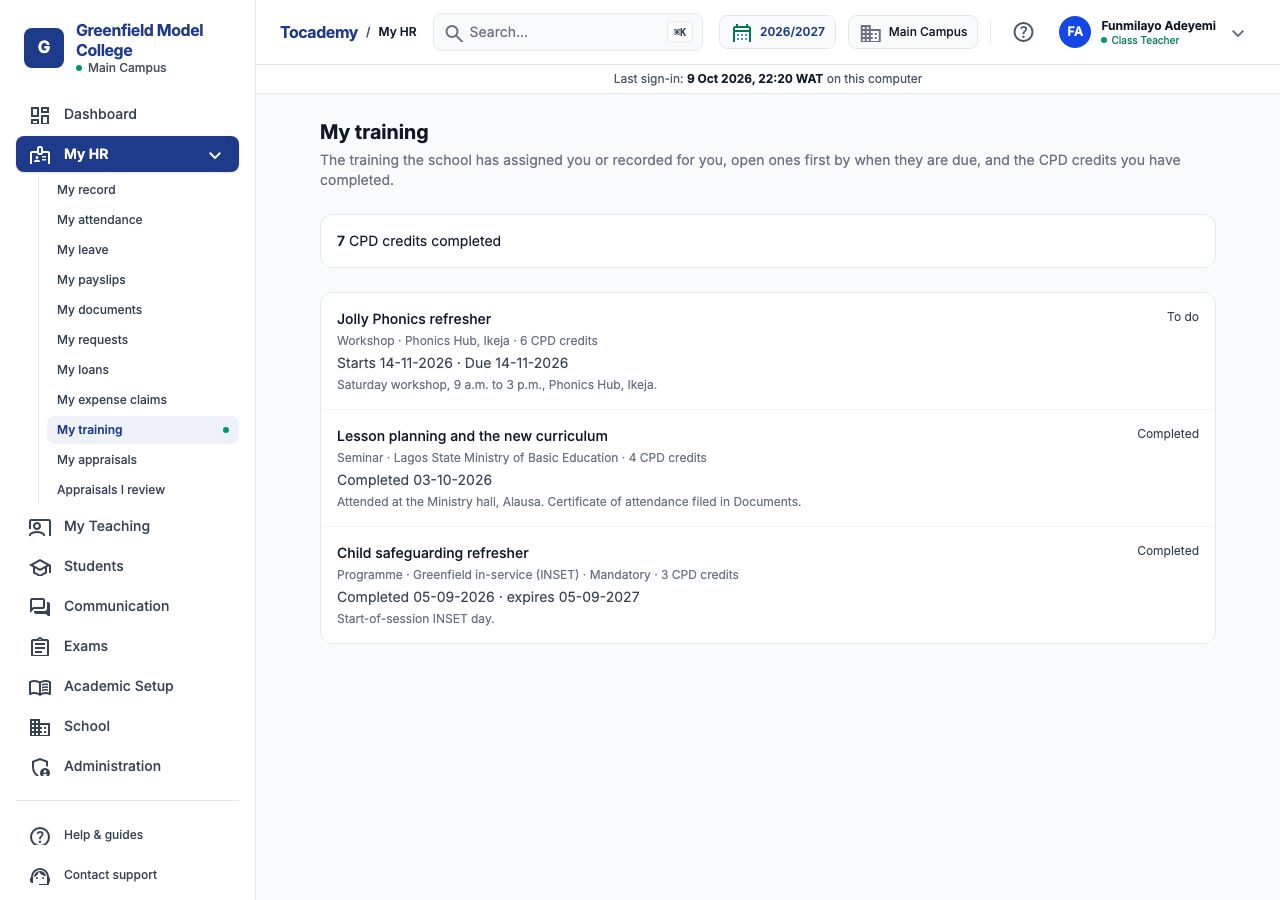
Every member of staff with a sign-in finds their own training under "My HR" → "My training": their total CPD credits completed, then each training — open ones first by due date — with its kind, provider, credits, and when it starts, is due, was completed or expires, plus any notes. It is read only: HR assigns, records and cancels training. The cost is never shown to staff. Funmilayo's page shows 7 CPD credits completed, the Jolly Phonics refresher as "To do", starting and due 14-11-2026, and her two completed trainings.
13. Training in appraisals
Training feeds a teacher's appraisal as evidence. The "Analytics" tab of a teacher's staff record includes "Training completed" — the share of the teacher's training in the period that is complete, from the training records — beside their results, attendance and lesson-plan figures; Funmilayo's read 50% while the Jolly Phonics refresher was still to come. The teacher evaluation template has a "Professional development" criterion that reviewers score with this in mind. See the Appraisals and Teacher Evaluation guide.
Still stuck?
Email info@tocel.ng and tell us which guide you were following.