Vetting and Compliance
Record police, reference and other background checks for every employee, and keep certificates, TRCN registrations and school deadlines from lapsing unnoticed.
1. What this covers
Schools have a duty to know that the adults around pupils have been checked, and that the papers that allow them to work — a TRCN registration, a driving licence, a first-aid certificate, a medical certificate — are still in date. Tocademy keeps three things for each employee: vetting checks (on the "Vetting" tab of their record), compliance deadlines the school sets (on the "Compliance" tab), and certifications and professional registrations with their expiry dates (on the "Profile" tab). One page, "Compliance" in the HR menu, then brings everything that is falling due across the school into a single list. The examples use Greenfield Model College's staff; their records were set up in the Staff Records guide.
2. The Vetting tab
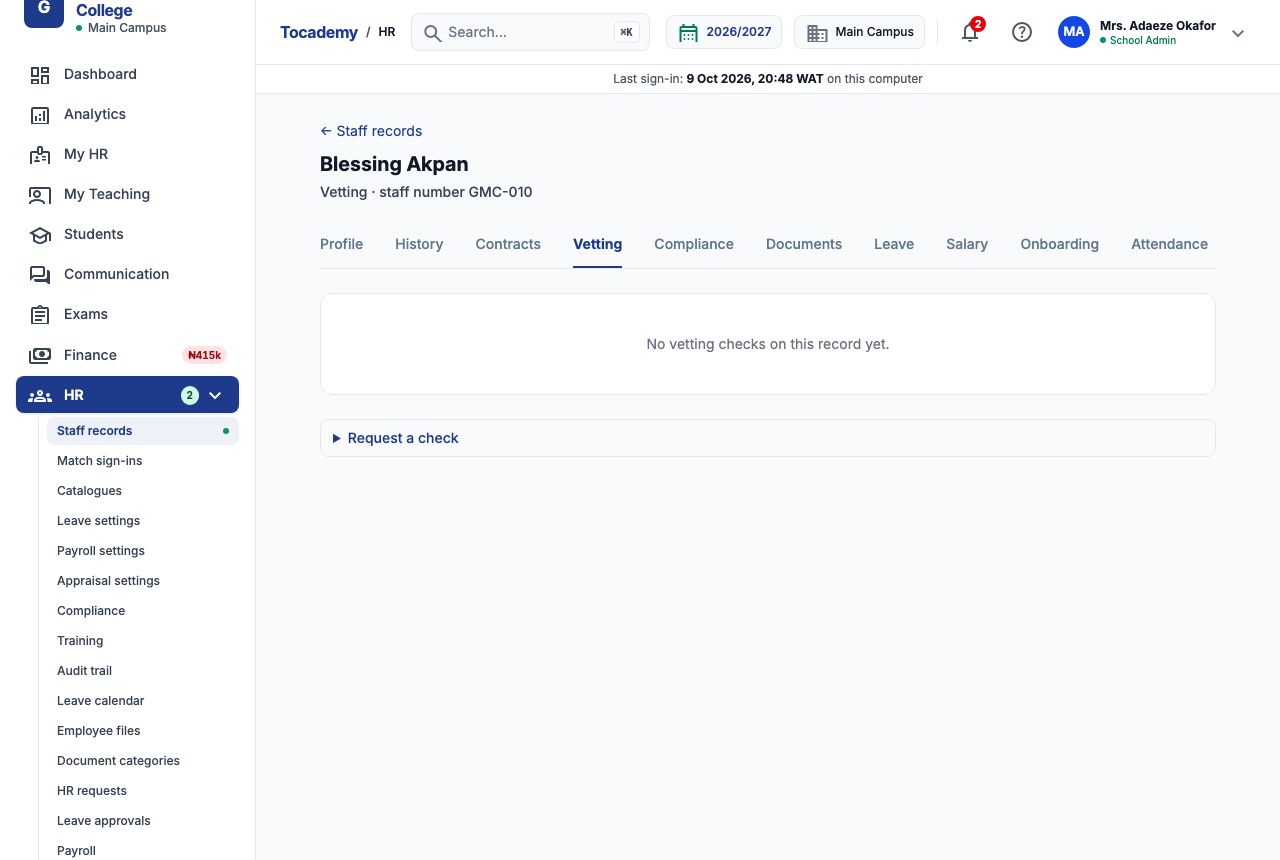
Open a staff record from "Staff records" and choose the "Vetting" tab. It lists every check ever requested for this person, newest first, each with its status: Pending, In progress, Passed, Failed, Waived or Expired. A new employee's tab says there are no vetting checks yet. Six kinds of check can be recorded: Identity, Qualification, Professional licence, Reference, Safeguarding and Background (use Background for a police character check).
3. Example: Musa Danladi's police check — requesting it
Musa Danladi drives the school bus, so Greenfield wants a police character certificate on file. On his "Vetting" tab, open "Request a check". Choose "Background" in "Check". Leave "Registration checked" on "None — the check is about the person" (that field is only for a professional licence check). Press "Request check". The message Check requested. It is pending. appears, and the check is listed with a Pending badge. When you send the request to the police, press "Mark as in progress" on the check so everyone can see it is under way.
4. Recording the result
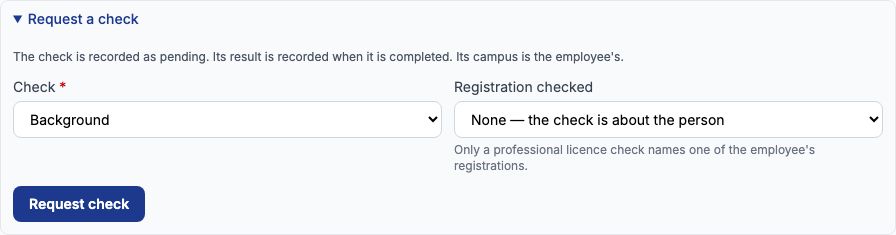
When the certificate comes back, open "Record the result" on the check. Choose "Passed" in "Result" (the other choices are Failed and Waived). Set "Completed on" to the date on the certificate, 08-10-2026. Set "Valid until" to when the school will want a fresh check — Greenfield renews police checks every two years, so 07-10-2028; leave it blank for a check that never expires. Type who verified it in "Verified by" (Nigeria Police Force, Ikeja Division) and a short note in "What it found". Press "Record result". A result is recorded once and cannot be edited; if it was wrong, request a new check and the history shows both.
5. A passed check and its expiry
The check now shows Passed, the date it was completed, the date it expires, what it found and who verified it. Within 30 days of the expiry date the check gains an orange "Expires in" marker, and the expiry also appears on the HR compliance page so you can request the next check in time. Greenfield's other staff already have checks on file: police checks for Grace Ojo, Chinedu Eze, Ngozi Okonkwo, Funmilayo Adeyemi and Emeka Nwosu (Emeka's runs out on 24-10-2026), a reference check for Tunde Bakare and a qualification check for Ibrahim Musa.

6. Checks still open, and who can read the results
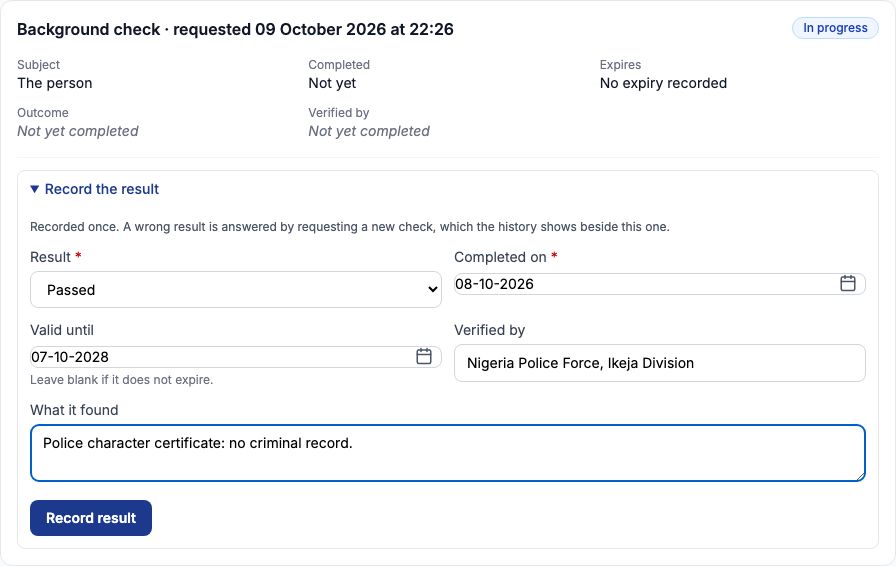
Aisha Bello, who joined in September, still has two open checks: a Reference check that is In progress and a Safeguarding check that is Pending. Each open check offers "Record the result", and a pending one also "Mark as in progress". What a check found can be sensitive. Only people whose role includes "View vetting outcomes" can read the Outcome and Verified by lines; others see Result restricted, although they can still record a result. Requesting and completing checks needs "Manage staff vetting checks". Both are set on Roles & Permissions, as described in the Setting up HR guide.
7. Checking a teacher's TRCN registration
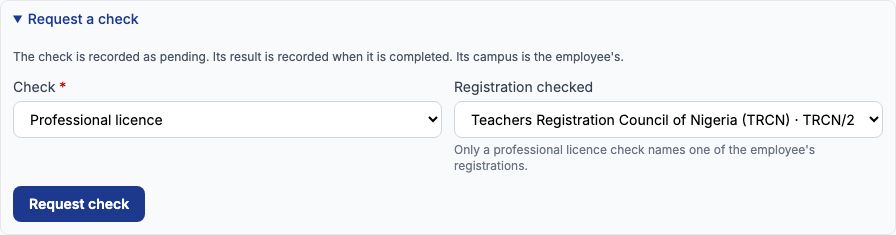
A teacher's TRCN registration is recorded on their profile under "Professional registrations" (see section 11). To record that the school verified it with TRCN, request a check of the kind "Professional licence" and, in "Registration checked", choose the registration — here Ibrahim Musa's Teachers Registration Council of Nigeria (TRCN) registration, which expires on 19-10-2026. The check then names that registration as its subject. Only a professional licence check can name a registration.
8. Certificates with expiry dates
Certificates such as first aid, safeguarding training or a driving licence are kept under "Certifications" on the profile, each with its issuing body, number, issue date and expiry date. They are added on the new-record form or through "Edit record". A certificate that expires within 30 days carries an orange "Expires in" marker — Funmilayo Adeyemi's First Aid at Work certificate from the Nigerian Red Cross Society, expiring 28-10-2026, showed "Expires in 19 days" — and it is listed on the HR compliance page as a Certification expiry.

9. Example: renewing Funmilayo's first-aid certificate
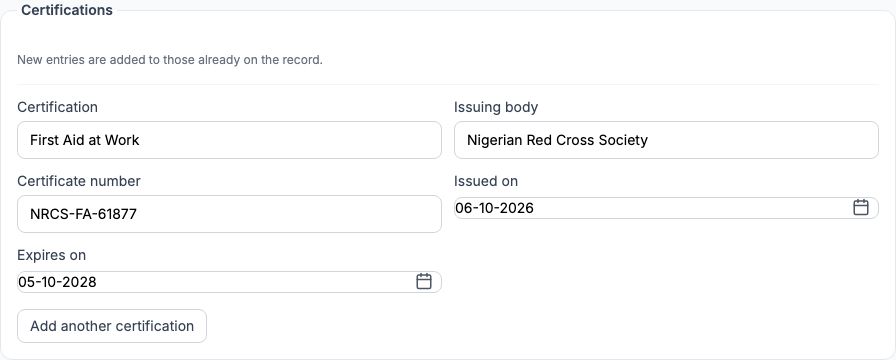
Funmilayo attended a refresher course on 6 October 2026. On the "Certifications" panel choose "Record renewal" beside First Aid at Work. The edit form opens with a note saying a renewal is being recorded, and with the certificate's name and issuing body already filled in. Type the new "Certificate number" (NRCS-FA-61877), "Issued on" 06-10-2026 and "Expires on" 05-10-2028, add a reason such as First aid refresher course completed, and press "Save changes". The new certificate becomes the current one and the old one moves under "Earlier certificates", so the history is kept and the expiry warning goes away.
10. After the renewal
The profile now shows First Aid at Work with the new number and an expiry of 05-10-2028, and "Earlier certificates (1)" holds the certificate that was about to lapse. Remove a certificate only if it was entered by mistake; an expired one is better kept as history.

11. Renewing a TRCN registration
TRCN keeps the same registration number when a teacher renews, so a renewal differs from the old entry only by its dates. To record Funmilayo Adeyemi's renewed TRCN registration (TRCN/2016/112093, previously expiring 14-11-2026), choose "Record renewal" beside it under "Professional registrations". The edit form opens with the registering body and number already filled in. Set "Issued on" to 05-10-2026 and "Expires on" to 14-11-2029, and press "Save changes". The renewed registration becomes the current one and the old one moves under "Earlier registrations", so the history is kept and the expiry warning goes away.

12. Example: a medical deadline for Musa Danladi
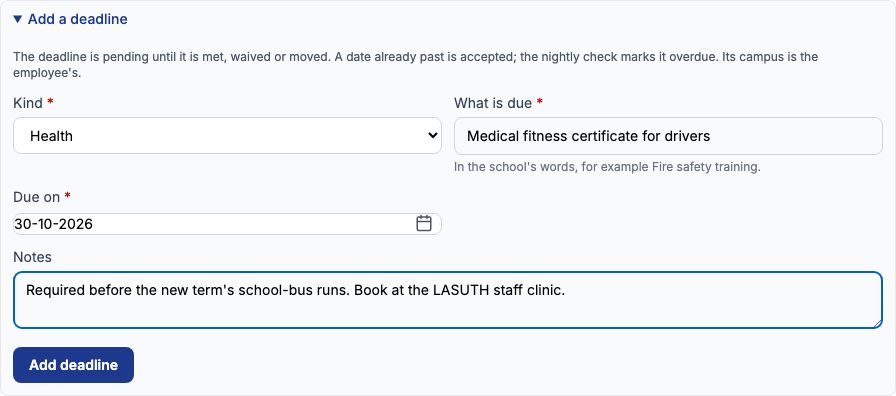
Some things the school must chase do not come with a certificate number — a medical, a training session, an insurance renewal. These are compliance deadlines. On Musa Danladi's "Compliance" tab, open "Add a deadline". Choose "Health" in "Kind" (the kinds are Statutory, Insurance, Health, Safeguarding and Other). Type Medical fitness certificate for drivers in "What is due", set "Due on" to 30-10-2026, add a note, and press "Add deadline". The deadline is pending until it is met, moved or waived. Greenfield also has deadlines for Tunde Bakare's fidelity guarantee insurance renewal (23-10-2026), Grace Ojo's child protection refresher training (20-11-2026) and Ngozi Okonkwo's fire safety training (04-12-2026).
13. Meeting, moving or waiving a deadline
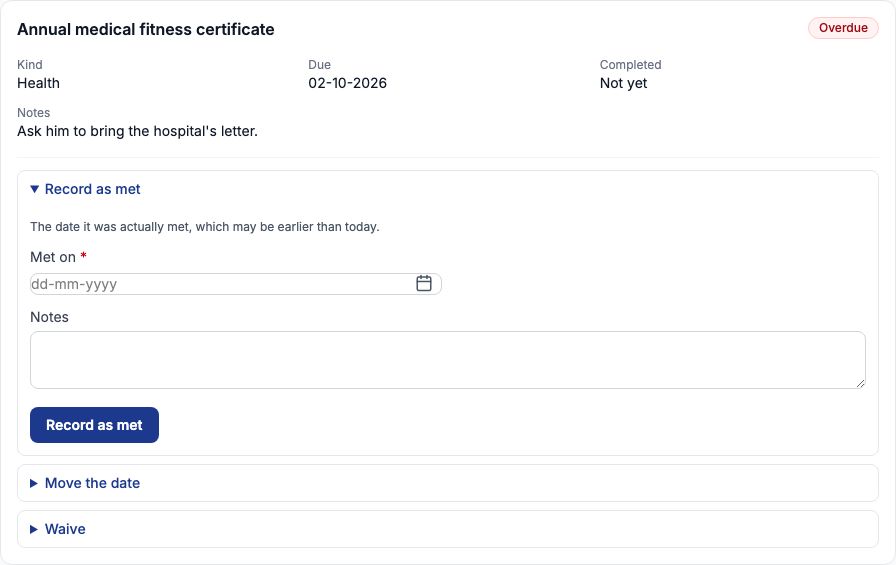
Each pending deadline offers three answers. Open "Record as met", give the date it was actually met in "Met on" and press "Record as met". Open "Move the date", give a "New due date" and press "Move deadline" — the old date stays on the audit trail. Open "Waive", give a reason and press "Waive deadline" when the school decides not to require it; who decided is recorded. Emeka Nwosu's annual medical fitness certificate was due on 02-10-2026 and has not been handed in, so it now reads Overdue. A deadline whose date has passed is marked Overdue by Tocademy's nightly check; until that check has run it still reads Pending.
14. Everything falling due: the HR compliance page
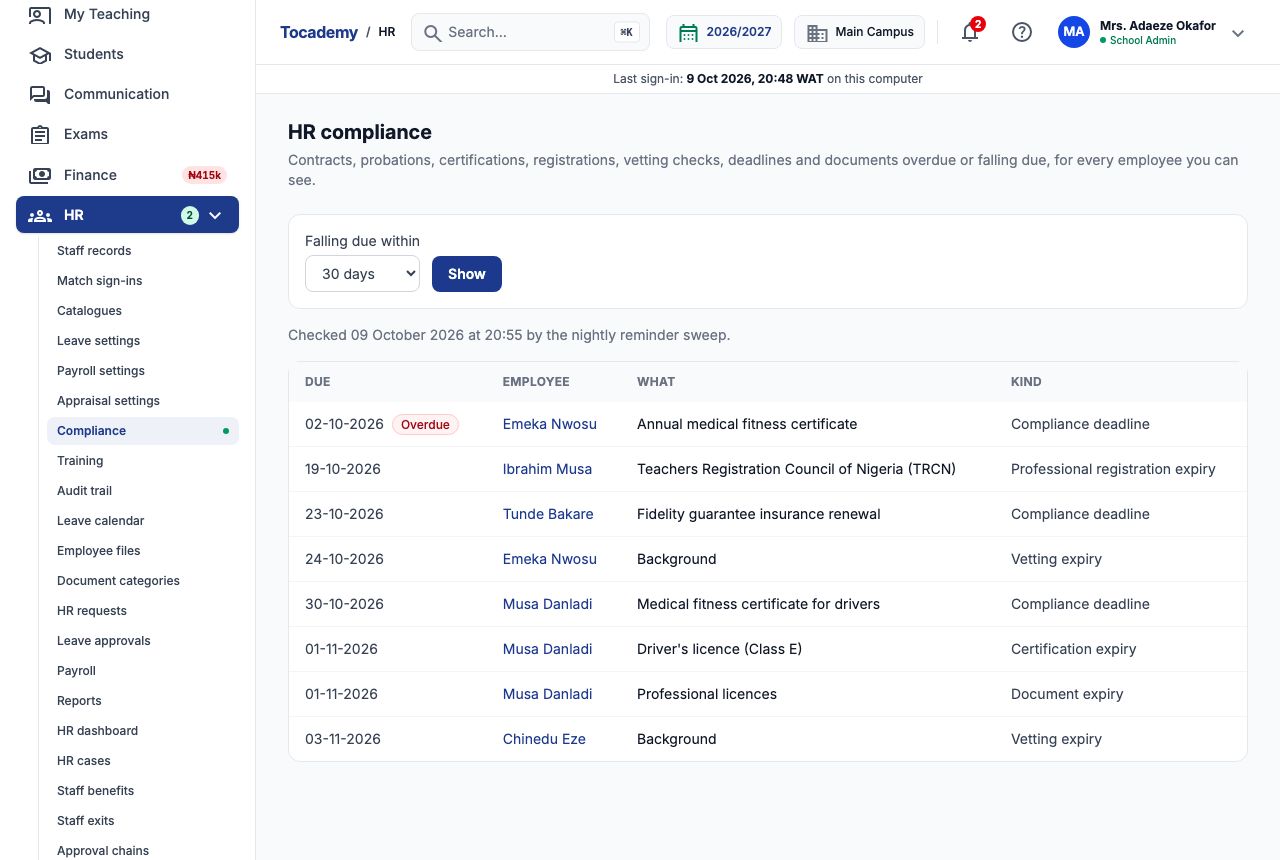
Choose "Compliance" in the HR menu. "HR compliance" lists, for every employee you are allowed to see, what is overdue or falls due soon: contract and probation ends, certifications, professional registrations, vetting checks that expire, the school's own deadlines, and documents in categories that track expiry. Each row shows the due date, the employee (open the name to go straight to the right tab), what is due and its kind. In "Falling due within" choose 7, 30, 60 or 90 days and press "Show". Anything already past its date and still owed comes first with an Overdue marker — at Greenfield, Emeka Nwosu's medical certificate. In the next 30 days Greenfield then had Ibrahim Musa's TRCN registration (19-10-2026), Tunde Bakare's insurance, Emeka Nwosu's police check, Musa Danladi's medical, licence certificate and licence scan, and Chinedu Eze's police check.
15. Looking further ahead
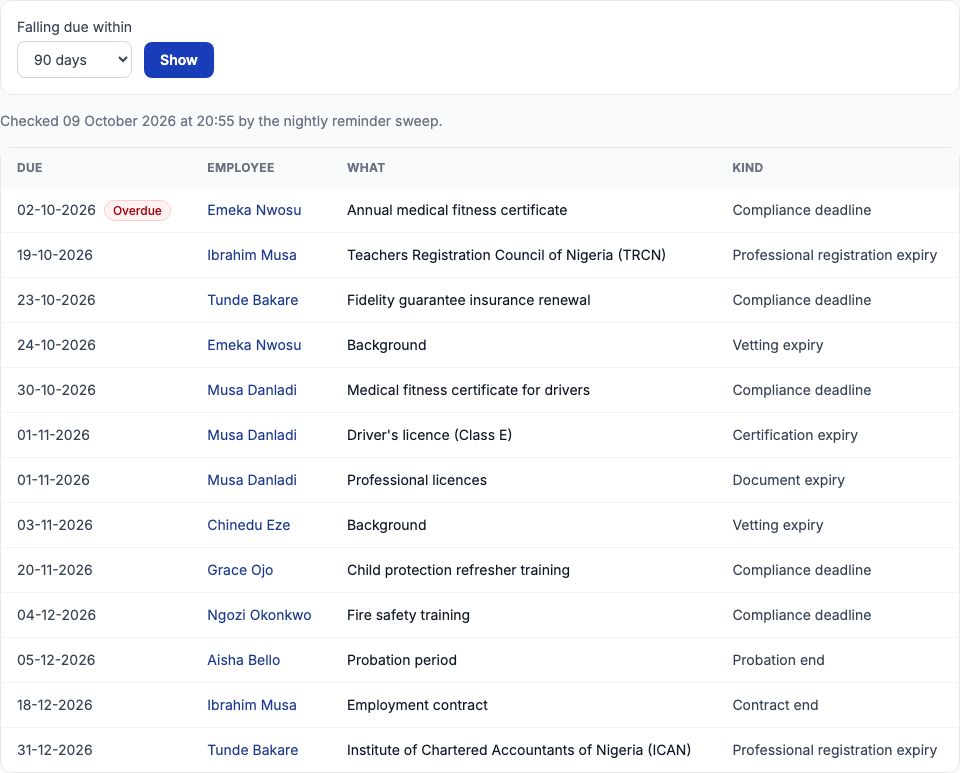
At 90 days the list also shows Grace Ojo's training, Ngozi Okonkwo's fire safety training, Aisha Bello's probation period ending 05-12-2026, Ibrahim Musa's fixed-term contract ending 18-12-2026 and Tunde Bakare's ICAN registration. The orange "Not yet checked" notice appears until Tocademy's nightly reminder sweep has run for your school for the first time; after that the page says when it was last checked, and an empty list then genuinely means nothing is due. Anything whose date has already passed and is still owed, like Emeka Nwosu's medical certificate, is listed at every window with an Overdue marker, until it is met, moved or waived.
16. A simple routine
Once a week, open "Compliance" with 30 days selected and work down the list: request the next police check, chase the certificate, or record the deadline as met. At the start of each term, look at 90 days so that contract ends and probation decisions are planned. When a new member of staff joins, request their checks on the "Vetting" tab on their first day and add their certificates and TRCN registration with expiry dates, so nothing has to be remembered by hand.
Still stuck?
Email info@tocel.ng and tell us which guide you were following.