Fixed Assets and Tax Codes
Enter your own VAT and withholding-tax rates, keep a register of buses, buildings and equipment, and let depreciation post itself every month.
1. Tax codes: the school enters its own rates
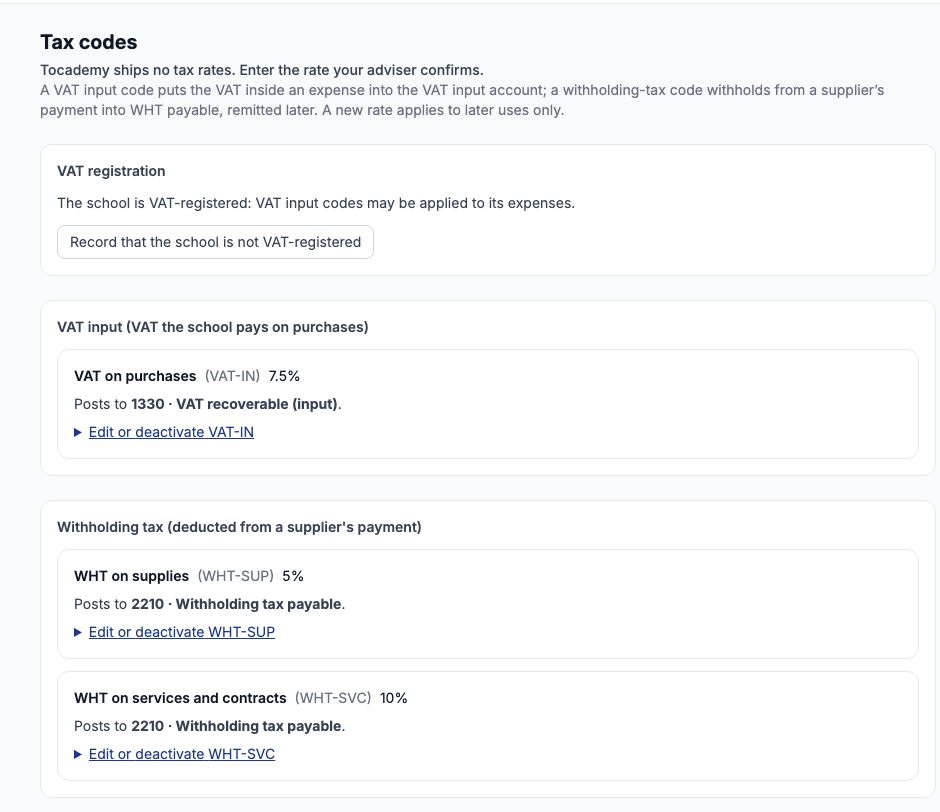
Tocademy comes with no tax rates at all — the page says "Tocademy ships no tax rates. Enter the rate your adviser confirms." — because rates change and your tax adviser, not the software, decides which apply to you. Open Accounting → Tax codes. There are three kinds of code: VAT input (the VAT inside what the school buys), VAT output (VAT the school charges, for the few schools that do) and withholding tax (the part of a supplier's payment the school keeps back and pays to the tax authority). Managing tax codes needs the accounting settings permission.
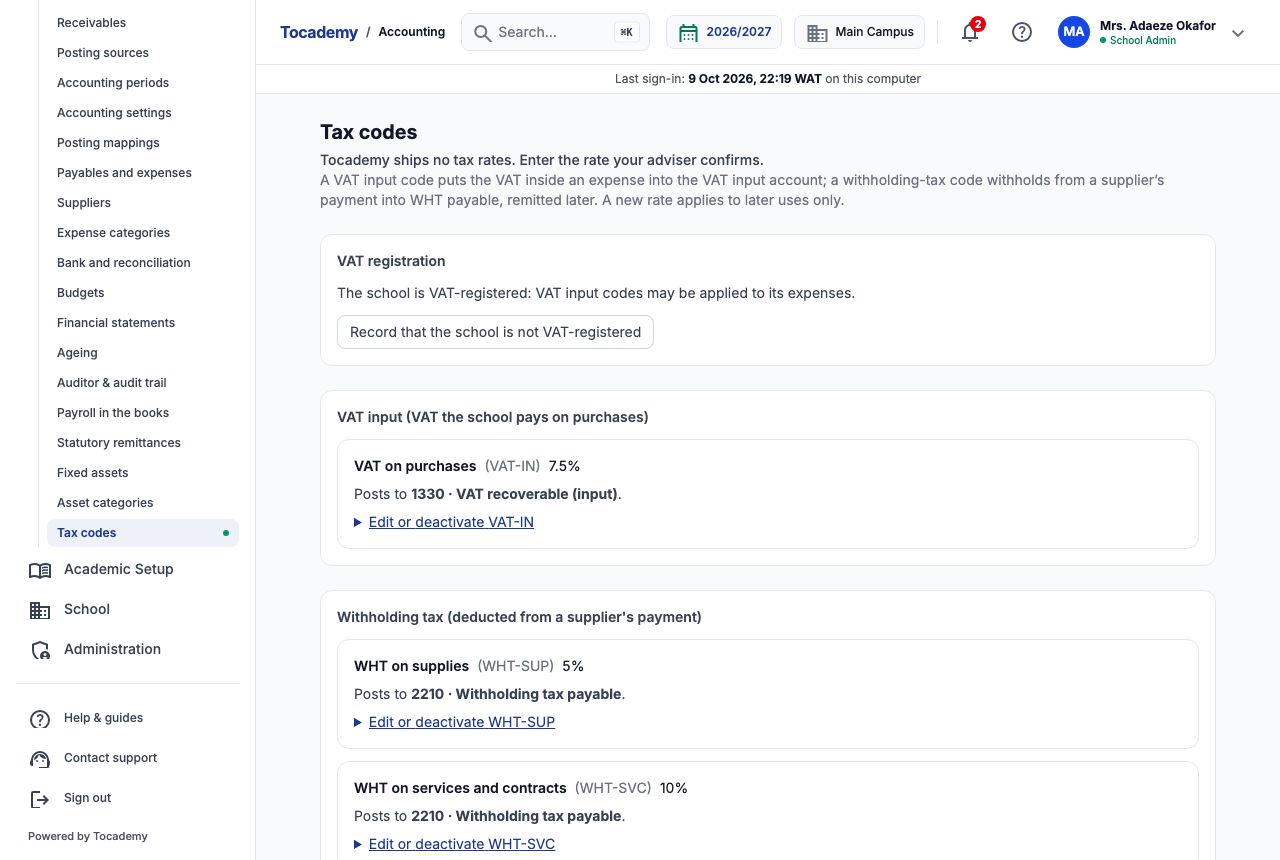
2. Add a tax code
Under "Add a tax code" type a short "Code" and a "Name", choose the kind in "Kind (fixed once made)" — for example "VAT input (VAT the school pays on purchases)" or "Withholding tax (deducted from a supplier's payment)" — and type the rate as a plain number (7.5 for 7.5%). Leave "Posts to (optional)" alone unless your accountant wants a different account: VAT input then goes to 1330 · VAT recoverable (input) and withholding tax to 2210 · Withholding tax payable. Press "Add tax code". Greenfield added three: VAT-IN "VAT on purchases" at 7.5%, WHT-SUP "WHT on supplies" at 5% and WHT-SVC "WHT on services and contracts" at 10%. If a rate changes later, edit the code and type the new rate; it applies only to uses from then on, and everything already recorded keeps the rate it was recorded with.
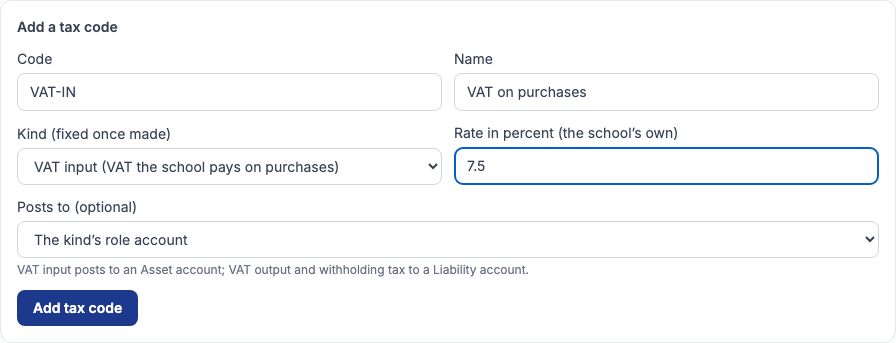
3. The VAT-registration switch
Most schools are not VAT-registered, and an unregistered school must not claim back VAT, so VAT input codes stay hidden from expenses until you say otherwise. If your school is registered, press "Record that the school is VAT-registered". The page then reads "The school is VAT-registered: VAT input codes may be applied to its expenses." and every expense form offers "VAT inside the amount" (see the Expenses and Suppliers guide, where ₦450,000 of diesel is split into ₦418,604.65 of diesel and ₦31,395.35 of VAT). Press "Record that the school is not VAT-registered" to switch it back. Withholding-tax codes work whether or not the school is VAT-registered: they are offered whenever an expense is paid, and are worked out on the amount without VAT.
4. Asset categories
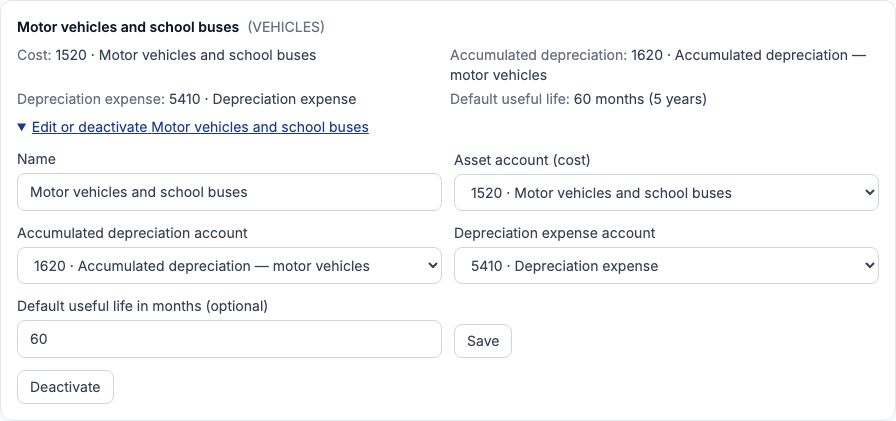
A fixed asset is something the school buys to use for more than a year — a bus, a generator, laptops, a building. Each belongs to a category that says where its cost sits in the books, where its depreciation builds up, and which expense account the monthly depreciation is charged to. Setting up the books creates six categories (furniture, ICT, laboratory and teaching equipment, land and buildings, plant and generators, motor vehicles and school buses); add more under "Add an asset category". No useful life is filled in for you — that is the school's own policy. Open "Edit or deactivate Motor vehicles and school buses", type 60 in "Default useful life in months (optional)" and press "Save": every new vehicle is then offered 5 years unless you change it.
5. Register a new asset
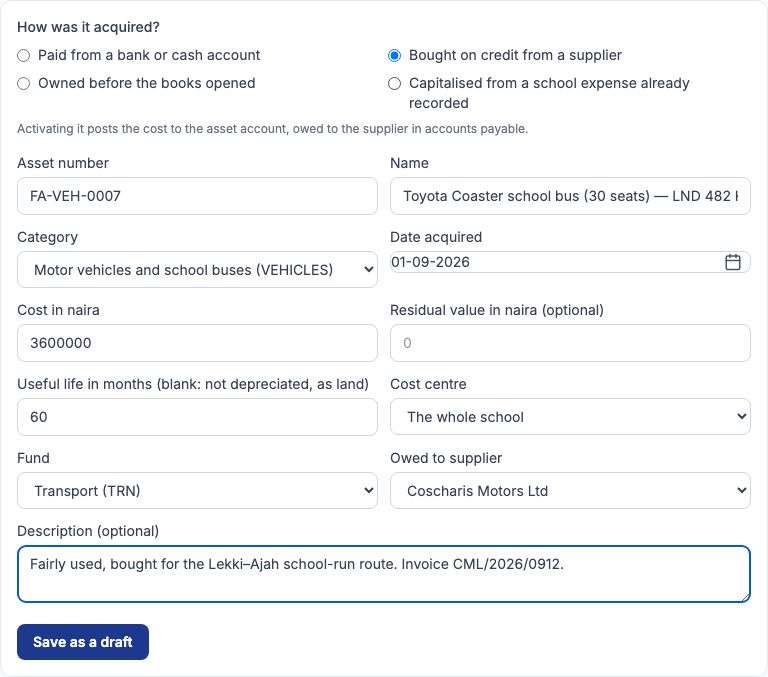
Go to Accounting → Fixed assets and choose "Register an asset". First answer "How was it acquired?" by selecting one of four: "Paid from a bank or cash account", "Bought on credit from a supplier", "Owned before the books opened" or "Capitalised from a school expense already recorded". The line under the choices says exactly what activating it will post. Then fill in "Asset number" (your tag number), "Name", "Category", "Date acquired", "Cost in naira", "Residual value in naira (optional)" (what you expect to sell it for at the end; leave it blank for nothing), "Useful life in months (blank: not depreciated, as land)", "Cost centre" and "Fund". Press "Save as a draft". A draft posts nothing, so you can check it calmly.
6. Worked example: the school bus
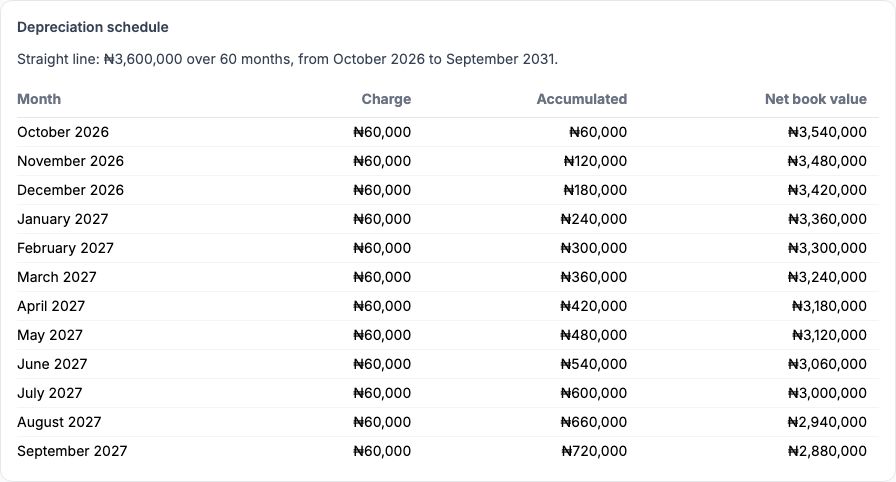
On 1 September 2026 Greenfield bought a fairly used Toyota Coaster (30 seats, LND 482 KJ) from Coscharis Motors Ltd for ₦3,600,000, to be paid later. The bursar selected "Bought on credit from a supplier", typed asset number FA-VEH-0007, chose the Motor vehicles and school buses category (which filled in 60 months), date acquired 01-09-2026, cost 3600000, no residual value, fund Transport, and chose Coscharis Motors Ltd in "Owed to supplier". Straight-line depreciation spreads the cost evenly over the life: ₦3,600,000 ÷ 60 months = ₦60,000 a month, or ₦720,000 a year.
7. Activate it
Open the draft, check every figure, then press "Activate this asset". Activation is the moment the asset enters the books, and its terms are then fixed: a mistake after that is corrected by disposal or a journal, never by editing. For the bus, activating posted the ₦3,600,000 to 1520 · Motor vehicles and school buses (the school now owns a bus worth that) and the same amount to 2110 · Accounts payable (the school owes Coscharis Motors) — a debit to the asset and a credit to the supplier's account. A bus paid from the bank would instead have been credited to the bank account. A draft you no longer want can be removed with "Delete this draft" before it is activated.

8. The asset's page
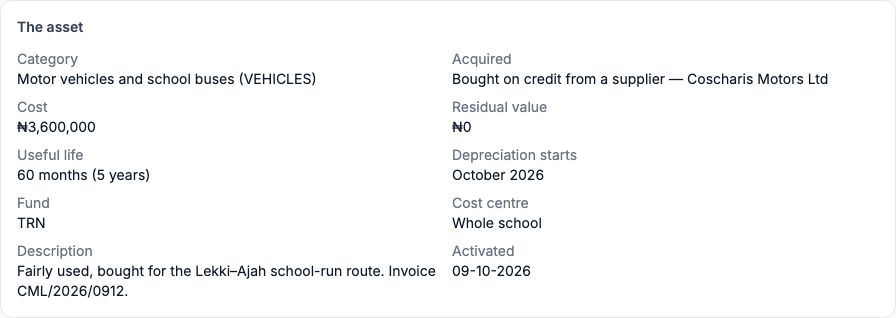
Once active, the asset's page shows how it was acquired ("Bought on credit from a supplier — Coscharis Motors Ltd"), its cost, residual value, useful life ("60 months (5 years)"), the month depreciation starts, its fund, cost centre and the date it was activated. Depreciation starts in the month after the asset was acquired, so the bus bought on 1 September starts in October 2026.
9. The depreciation schedule
"Depreciation schedule" lists every month of the asset's life with that month's charge, the depreciation accumulated so far and the net book value (cost less accumulated depreciation). For the bus: "Straight line: ₦3,600,000 over 60 months, from October 2026 to September 2031" — ₦60,000 each month, so after one year ₦720,000 has accumulated and the bus is carried at ₦2,880,000. Show this table to the board when they ask what the bus is "worth on paper".
10. Assets the school owned before the books opened
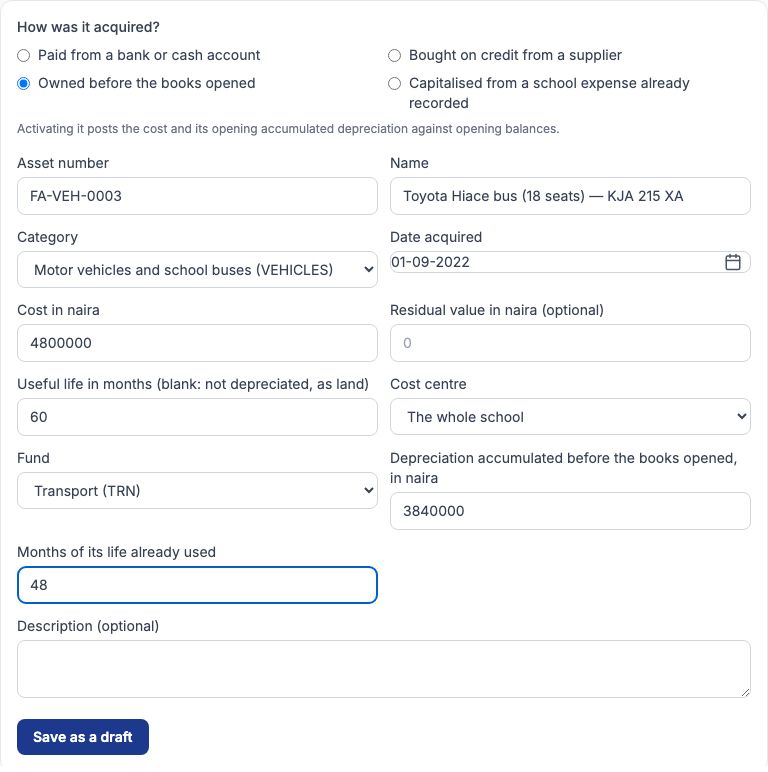
Most schools already own buses, generators and furniture on the day they start keeping books here. Register each with "Owned before the books opened": give its original "Date acquired" and "Cost in naira", then the "Depreciation accumulated before the books opened, in naira" and the "Months of its life already used" from your old records. Greenfield's old Toyota Hiace (FA-VEH-0003) cost ₦4,800,000 in September 2022 with a 60-month life; 48 months were used before September 2026, so ₦3,840,000 had accumulated (₦80,000 × 48). Activating it posts the cost and the accumulated depreciation against the opening balances account, and the schedule carries on for the 12 months left at ₦80,000 a month.
11. Its page and schedule
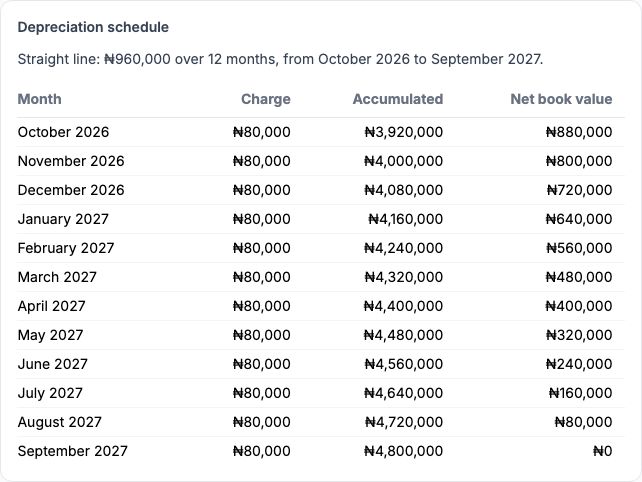
The Hiace's page shows "Before the books opened: ₦3,840,000 accumulated over 48 months", and its schedule reads "Straight line: ₦960,000 over 12 months, from October 2026 to September 2027" — the ₦960,000 left (₦4,800,000 − ₦3,840,000) spread over the 12 remaining months.
12. Capitalising an expense
Sometimes a purchase is first recorded as an expense — say a set of smartboards bought through Payables and expenses under a category that posts to an asset account such as 1540 · Computers and ICT equipment. Register it with "Capitalised from a school expense already recorded" and choose the expense in "The expense that bought it (approved or paid)"; narrow the list by expense date if it is long. Activating posts nothing, because the expense already put the cost into the asset account; it simply starts the depreciation. If the expense was posted to an ordinary expense account by mistake, correct that first with a journal, or the cost will be counted twice.
13. Monthly depreciation, previewed
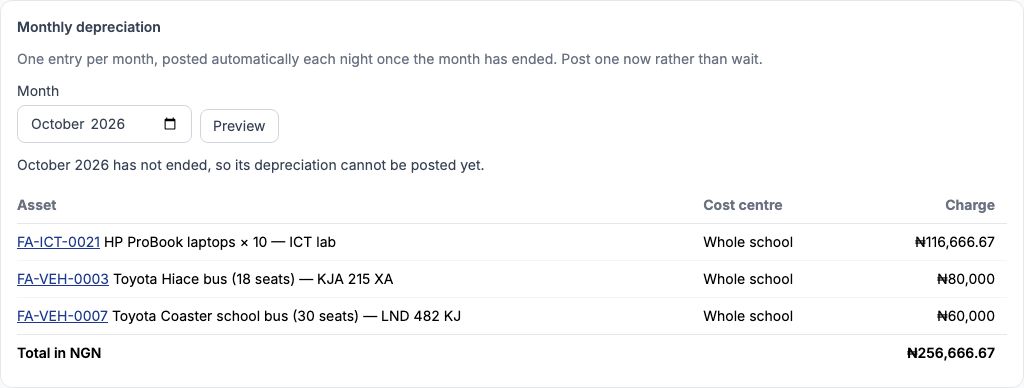
Depreciation posts itself: one entry for all assets, every night once a month has ended. You can look ahead at any time. In "Monthly depreciation" on Accounting → Fixed assets, set "Month" and press "Preview". For October 2026 the preview lists the laptops (₦116,666.67), the Hiace (₦80,000) and the bus (₦60,000), total ₦256,666.67, and says "October 2026 has not ended, so its depreciation cannot be posted yet." Each month's single entry debits 5410 · Depreciation expense and credits each category's accumulated depreciation account, so the cost of using the bus shows up month by month instead of all at once in the month it was bought.
14. Post a month now
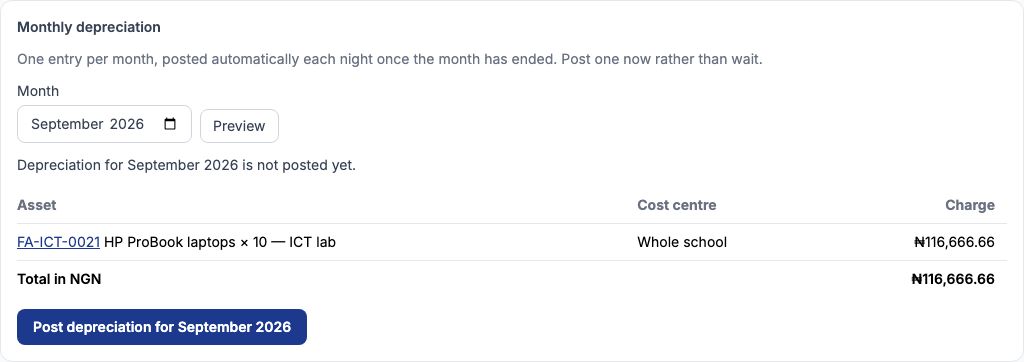
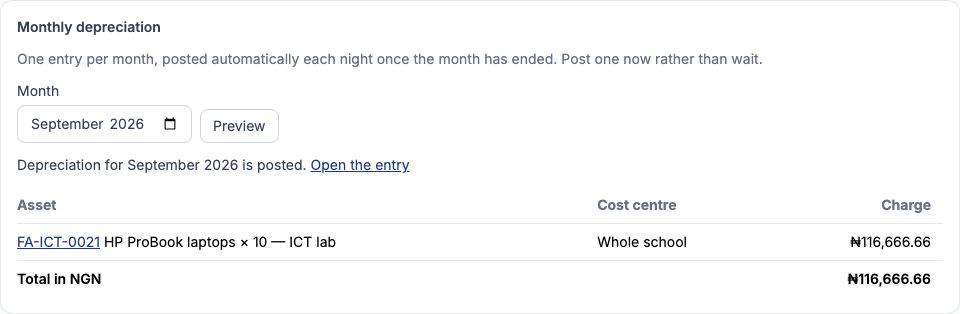
You do not have to wait for the night run. Preview a month that has ended and, if it has not been posted, press the "Post depreciation for" button, which names the month. Greenfield previewed September 2026: only the ICT-lab laptops (owned since July) were depreciating that month, at ₦116,666.66. After posting, the page says "Depreciation for September 2026 is posted." with a link to open the entry. A month can only be posted once, so the night run will not post it again. Do this before closing a month, so the month's statements include depreciation.
15. After posting
The posted month shows a link to its journal entry, and the register's accumulated depreciation and net book values move on by that month's charge.
16. Disposing of an asset, with a gain or a loss
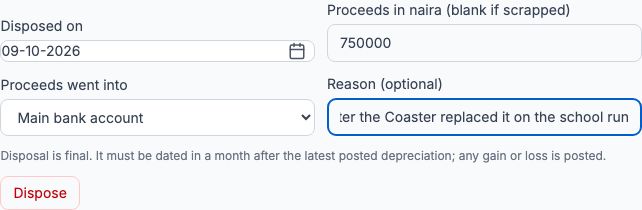
When an asset is sold, scrapped or written off, open "Dispose of this asset" on its page. Fill in "Disposed on", "Proceeds in naira (blank if scrapped)", choose the account in "Proceeds went into", and give a "Reason (optional)". Press "Dispose". Disposal is final and must be dated in a month after the latest posted depreciation. Tocademy removes the asset's cost and accumulated depreciation from the books and posts the difference between what you received and its net book value as a gain or a loss. Worked example: on 9 October 2026 Greenfield sold the old Hiace for ₦750,000 into the Main bank account. Its net book value was ₦960,000 (₦4,800,000 cost less ₦3,840,000 depreciation), so the school made a loss of ₦210,000 (₦960,000 − ₦750,000), posted to 4340 · Gain or loss on disposal of fixed assets. Had it sold for ₦1,000,000, the ₦40,000 above book value would have been a gain.
17. The register
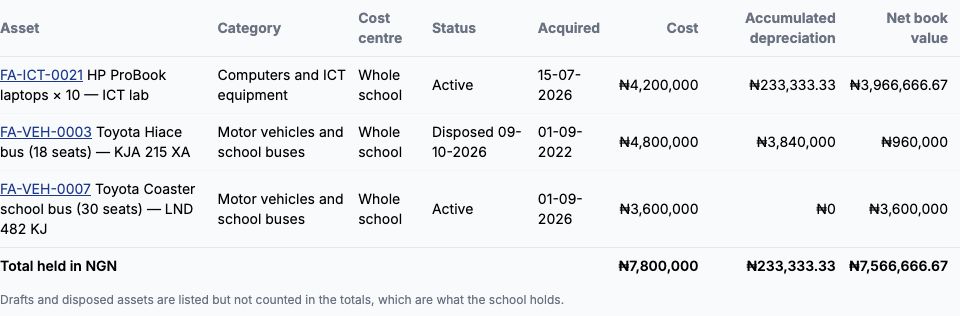
Accounting → Fixed assets lists every asset with its category, cost centre, status, acquisition date, cost, depreciation accumulated through the last month ended, and net book value, with totals of what the school holds — only active assets count in them, never a draft or a disposed asset. A disposed asset stays on the register marked "Disposed" with its date, so its history is never lost; set "Status" to "Active" and press "Show" to see only what the school still owns. Click an asset number to open its page.
Still stuck?
Email info@tocel.ng and tell us which guide you were following.