Setting Up Payroll
Tell Tocademy what a salary is made of, which statutory deductions apply and at what rates, the grades your school pays on, and each employee's approved salary, before you run your first payroll.
1. Open the payroll settings
Choose "Payroll settings" in the HR menu. The page has five tabs: "Pay components" (the building blocks of a salary), "Salary structures" (the pay attached to each grade), "Statutory deductions" (PAYE, pension, NHF and NHIS), "Payroll policy" (how a day's pay and overtime are worked out) and "Validation rules" (the checks every payroll run is held to). You need the Manage payroll configuration permission to change any of them; someone who only manages salaries can read the components and structures but not change them. Amounts are always typed in naira. Greenfield Model College pays every member of staff a basic salary plus a housing and a transport allowance, so it set up three components.
2. Add the pay components
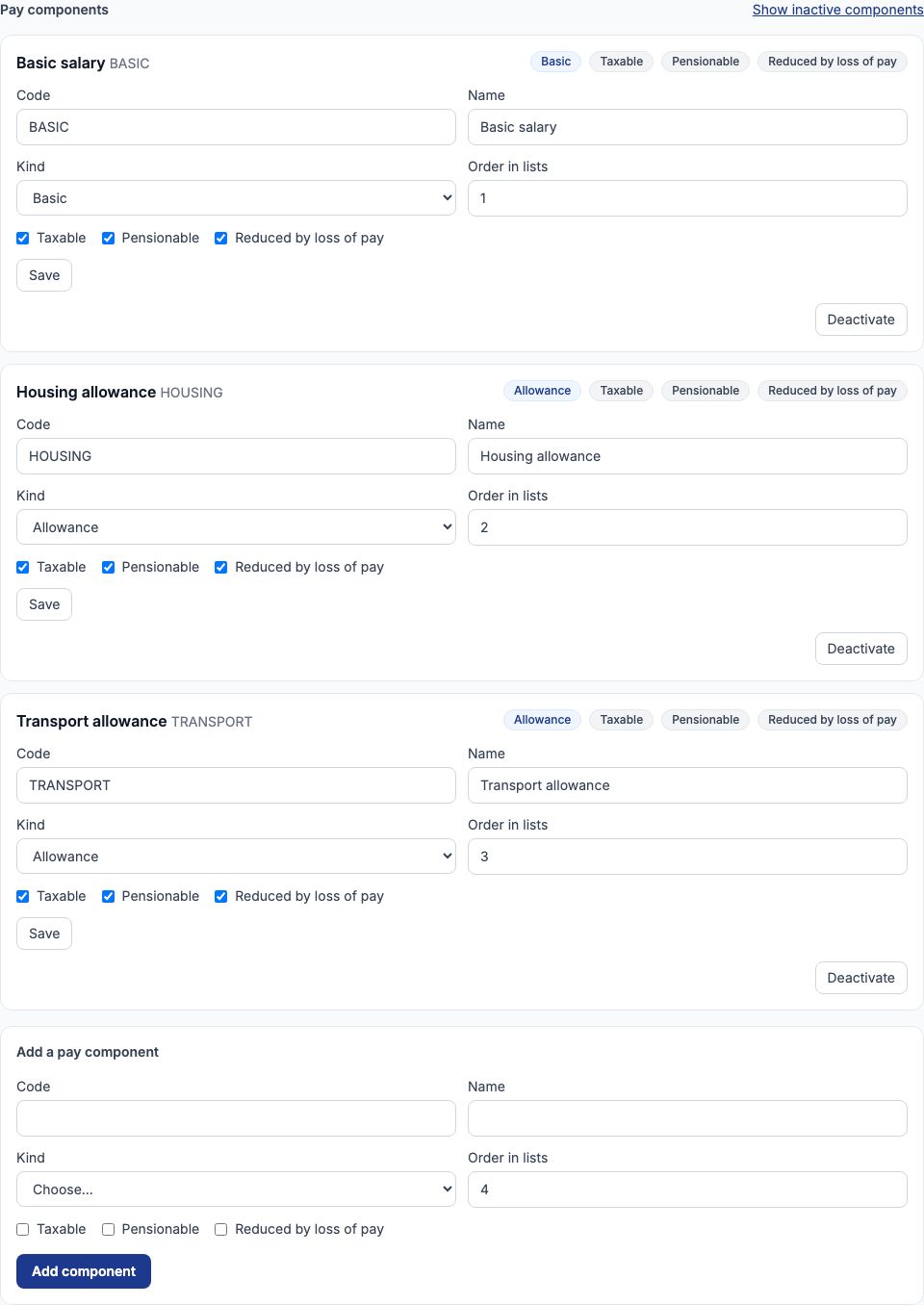
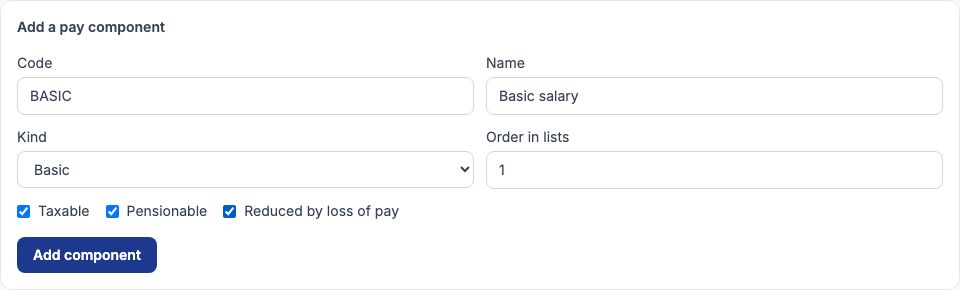
Under "Add a pay component" type a short "Code" and the "Name" staff will see on their payslip, choose its "Kind" — Basic, Allowance, Deduction, Employer contribution or Benefit — and set "Order in lists". Then decide three things: tick "Taxable" if PAYE is charged on it, "Pensionable" if pension is worked out on it, and "Reduced by loss of pay" if a day of unpaid leave should take a day's share of it away. Press "Add component". Greenfield added BASIC Basic salary (Basic, order 1), HOUSING Housing allowance (Allowance, order 2) and TRANSPORT Transport allowance (Allowance, order 3), all three taxable, pensionable and reduced by loss of pay. A school may have only one active basic component, and every salary must have exactly one basic line. Changing a component later never rewrites a salary that has already been approved — each salary keeps its own copy.
3. Statutory deductions: nothing is assumed
Open "Statutory deductions". Tocademy ships no tax or pension rates: until PAYE, Pension (employee), Pension (employer), NHF and NHIS each have a row, the amber note lists them and a payroll calculation refuses to run. For each one you either enter its terms or enter a "Not applied" row with the reason it does not apply to your school (for example, a school that pays its staff's health cover directly to an HMO might not deduct NHIS). Every row has a "Takes effect on" date, so when the law changes you enter a new row from the new date and the old one stays as history — a payroll for an earlier month still uses the rate that was in force then.

4. Example: PAYE on the 2026 bands
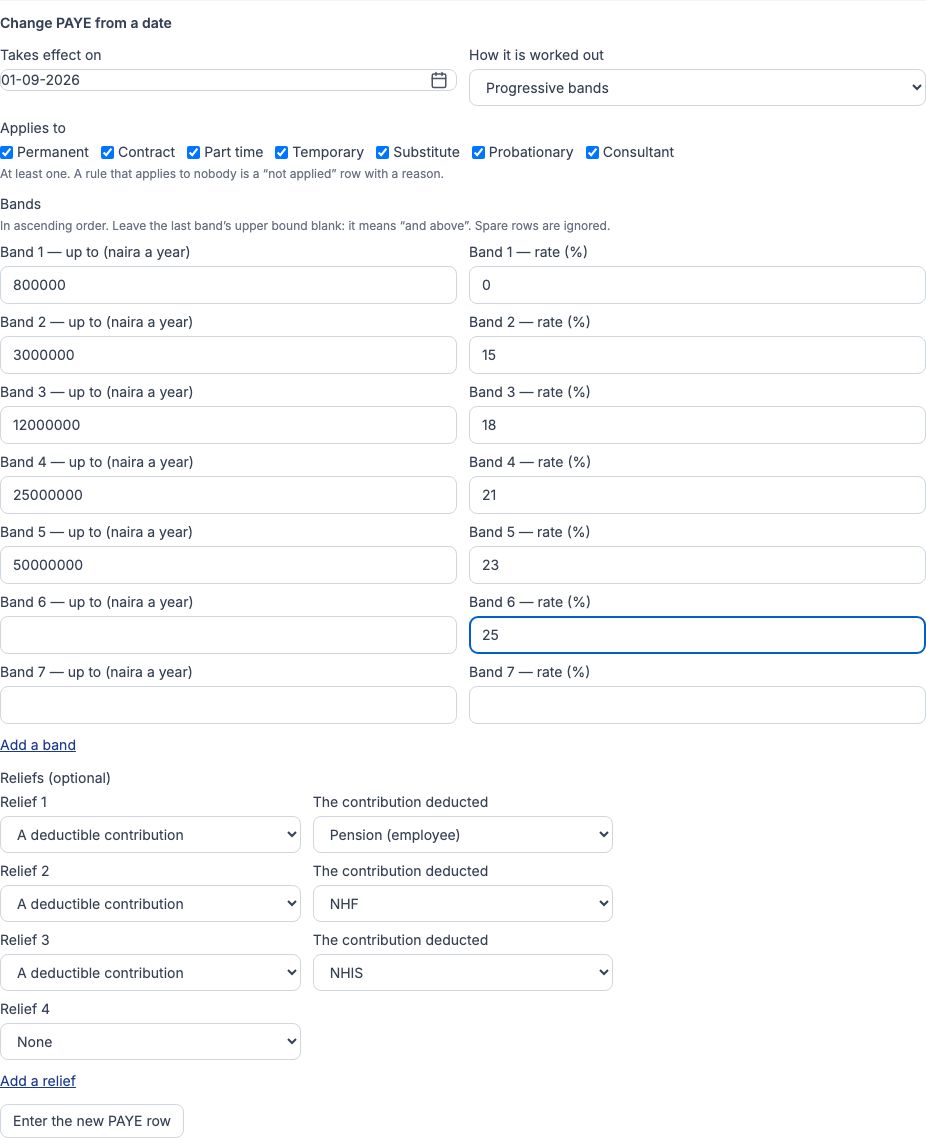
PAYE is worked out on progressive annual bands. In the PAYE card, set "Takes effect on" to 01-09-2026 and choose "Progressive bands" in "How it is worked out". Under "Applies to", tick every employment type. Enter the bands in ascending order, each with its upper limit in naira a year and its rate: up to ₦800,000 at 0%, up to ₦3,000,000 at 15%, up to ₦12,000,000 at 18%, up to ₦25,000,000 at 21%, up to ₦50,000,000 at 23%, and a last band with its upper limit left blank (meaning "and above") at 25%. Press "Add a band" if you need more rows. Under "Reliefs (optional)" choose "A deductible contribution" three times, for Pension (employee), NHF and NHIS, so those contributions are taken off pay before tax is worked out; press "Add a relief" for the third row. Press the Enter PAYE button under the form. The card now shows the bands and reliefs, in force since 01-09-2026. Once a row exists, the same card offers "Change PAYE from a date" instead, with the same fields, a spare band and relief row (spare rows are ignored) and an "Enter the new PAYE row" button; that is how you enter next year's bands.
5. Pension, NHF and NHIS
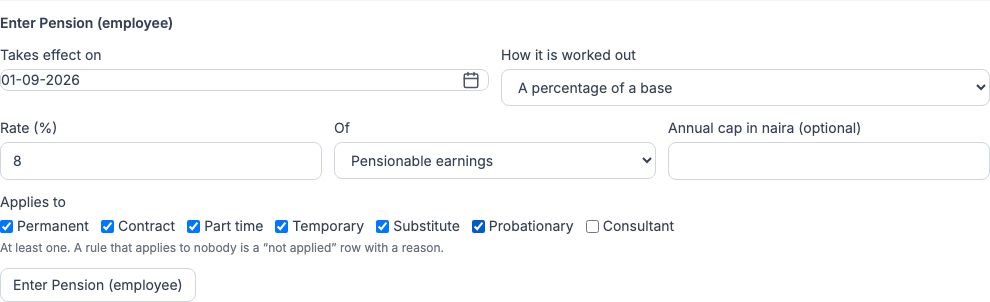
The other four are a percentage of a base. For Pension (employee) choose "A percentage of a base", type 8 in "Rate (%)", choose pensionable earnings in "Of", and tick the employment types it applies to; leave "Annual cap in naira (optional)" blank unless your school caps it. Greenfield entered Pension (employee) at 8% and Pension (employer) at 10% of pensionable earnings, NHF at 2.5% of basic, and NHIS at 5% of basic, all from 01-09-2026 and for every employment type except Consultant. With those rows in place the amber note disappears. Because basic, housing and transport were all marked pensionable, pension is worked out on the whole ₦320,000 of a Level 10 salary, while NHF and NHIS use only the basic.
6. The payroll policy
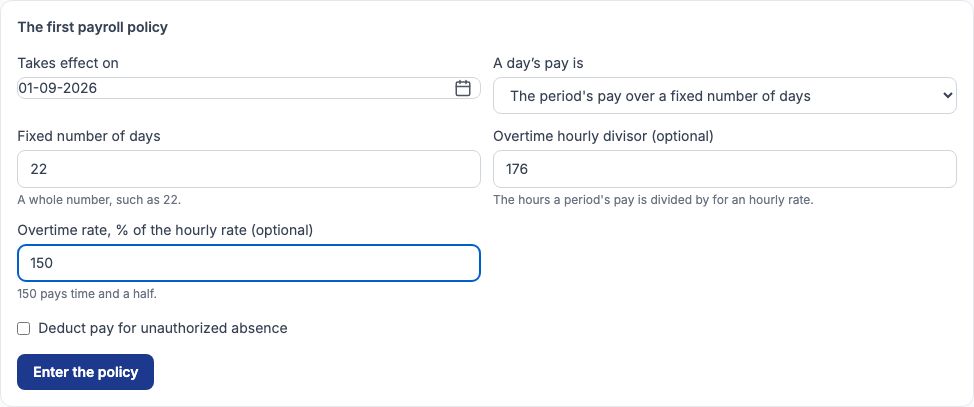
Open "Payroll policy". Until a policy is entered, calculation refuses. The policy says how a day's pay is worked out — the month's pay over its calendar days, or over a fixed number of days — which is what loss of pay for unpaid leave is based on. Greenfield set "Takes effect on" to 01-09-2026, chose "The period's pay over a fixed number of days" and typed 22 in "Fixed number of days", so one day of unpaid leave costs a Level 10 teacher ₦320,000 ÷ 22 = ₦14,545.45. It also typed 176 in "Overtime hourly divisor (optional)" and 150 in "Overtime rate, % of the hourly rate (optional)" (time and a half). Leave "Deduct pay for unauthorized absence" unticked unless your school wants a day with no clock-in and no approved leave to cost pay. Press "Enter the policy". A policy is never edited: to change it, enter a new one from a later date.
7. The validation rules
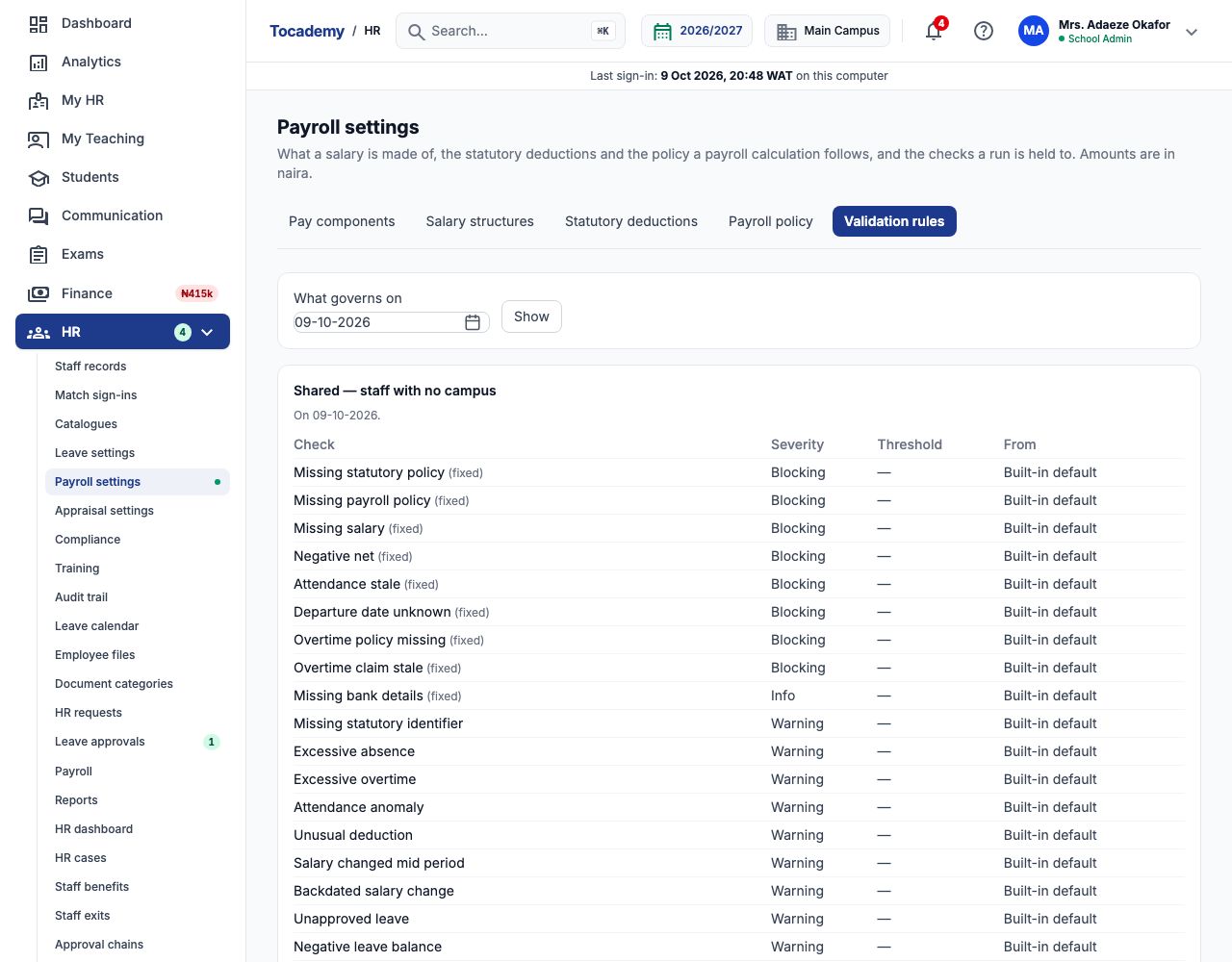
"Validation rules" lists every check a payroll run is held to and how serious each one is. Blocking checks (such as Missing salary, Missing statutory policy, Missing payroll policy and Negative net) stop a run from being submitted until they are fixed or the employee is excluded. Warnings (such as Missing statutory identifier — no TIN, pension PIN or NHF number on the record — Excessive absence or Unapproved leave) must each be acknowledged with a reason before submission. Checks marked (fixed) cannot be changed; for the others, the form under the table lets you change a check's severity or threshold from a date, for the whole school or one campus. Use "What governs on" and "Show" to see the rules for another date. Greenfield kept the built-in defaults.
8. Salary structures: the pay for each grade
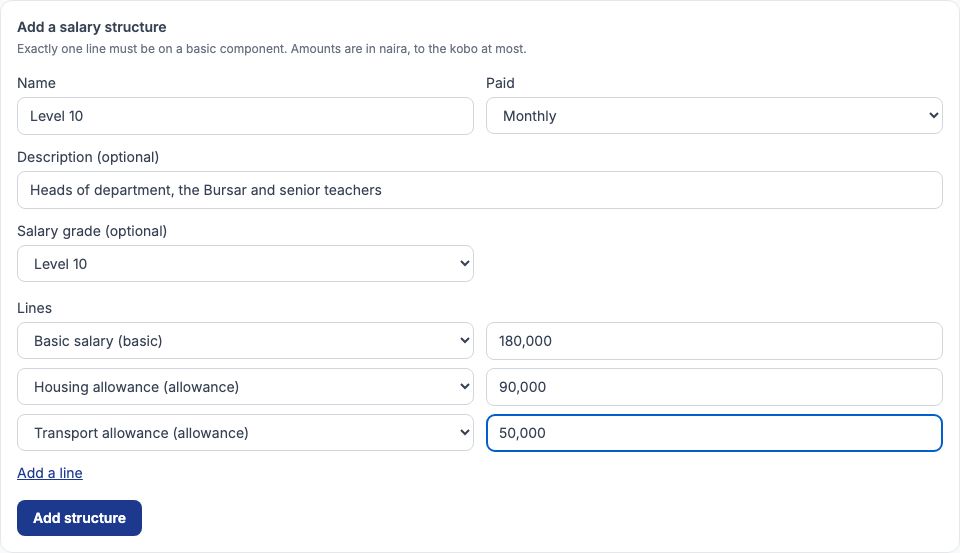
A salary structure is a template: the lines of pay attached to a grade. Open "Salary structures" and fill in "Add a salary structure": a "Name", how often it is "Paid", an optional description, the "Salary grade (optional)" it belongs to, and one line per component with its amount in naira. Press "Add a line" for more rows, then "Add structure". Greenfield's Level 10 structure is ₦320,000 a month: Basic salary ₦180,000, Housing allowance ₦90,000 and Transport allowance ₦50,000.
9. Greenfield's structures
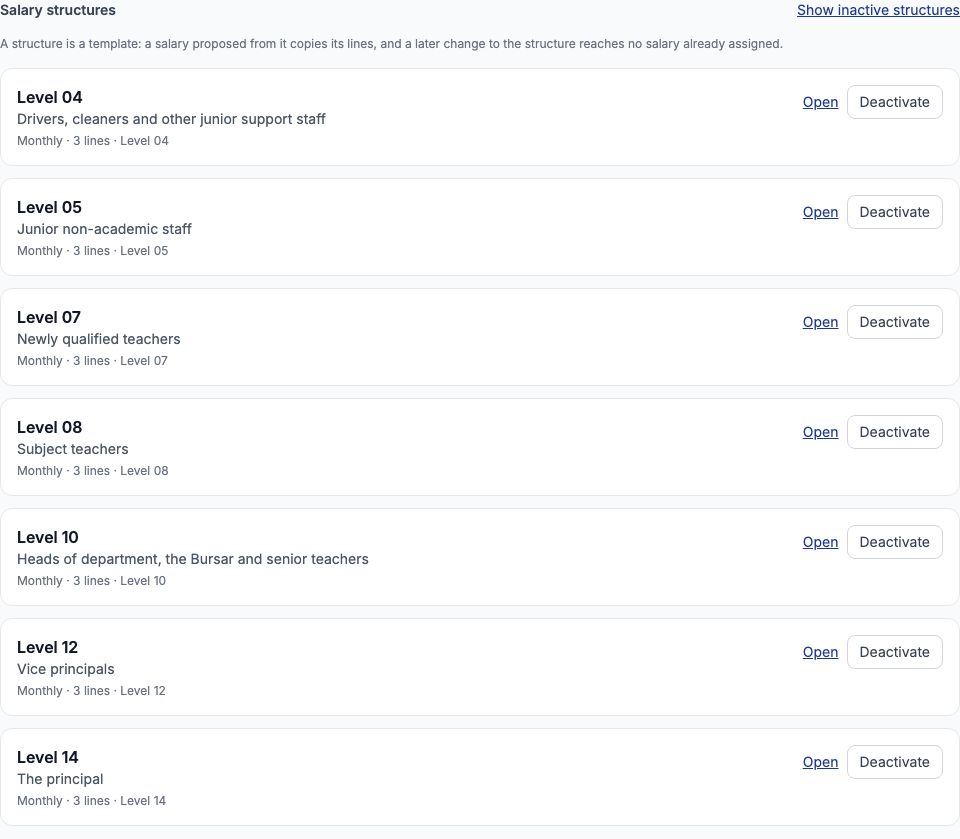
Greenfield added one structure for each of its grades: Level 04 ₦70,000 (₦40,000 basic, ₦20,000 housing, ₦10,000 transport), Level 05 ₦100,000, Level 07 ₦185,000, Level 08 ₦230,000, Level 10 ₦320,000, Level 12 ₦450,000 and Level 14 ₦650,000. Choose "Open" on a structure to see or edit its lines. Editing a structure, or pressing "Deactivate", never changes a salary that was already proposed from it — salaries copy the lines when they are proposed. To change everyone on a grade, use a bulk change (step 14).
10. Example: Chinedu Eze's salary
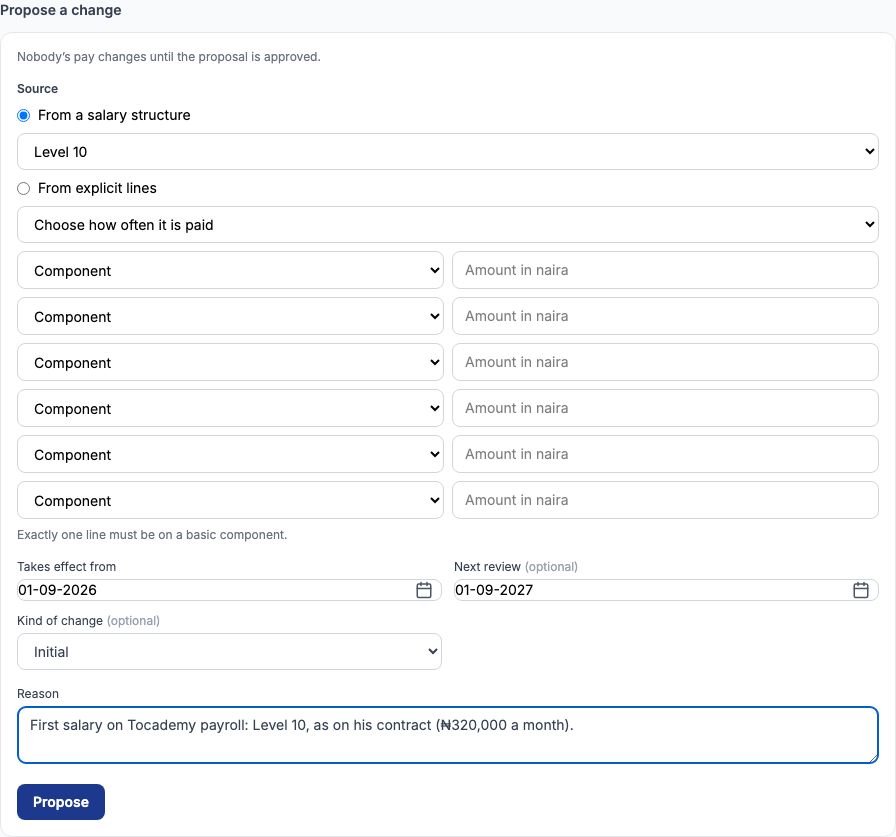
Each employee's salary lives on the "Salary" tab of their staff record. Open Chinedu Eze (GMC-003, Head of Sciences, Level 10) and scroll to "Propose a change". Under "Source" choose "From a salary structure" and pick Level 10 — or choose "From explicit lines" to type the lines yourself. Set "Takes effect from" to 01-09-2026 and "Next review" to 01-09-2027, choose Initial in "Kind of change", and type the "Reason" — Greenfield wrote that this is his first salary on Tocademy payroll, Level 10 as on his contract. Press "Propose". Nobody's pay changes until the proposal is approved; until then the history shows it as pending, and a payroll run treats Chinedu as having no salary.
11. A second person approves it
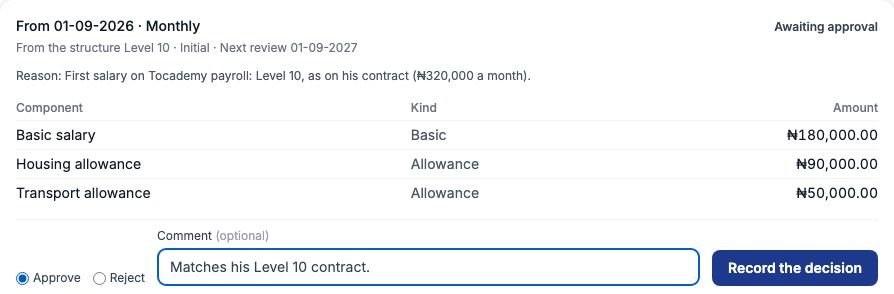
Salary changes go through the salary-change approval chain (HR → "Approval chains"). By default anyone with the Approve payroll decisions permission — the school admins — can approve, and nobody may approve a change they proposed themselves. At Greenfield the administrator, Mrs. Adaeze Okafor, proposes and the proprietor, Mrs. Ngozi Eze, approves. She opened Chinedu's Salary tab, chose "Approve" on the pending row, added the comment Matches his Level 10 contract, and pressed "Record the decision". (Choosing "Reject" ends the proposal; the proposer can also withdraw a pending change with "Withdraw this change".)
12. The salary in force and its history
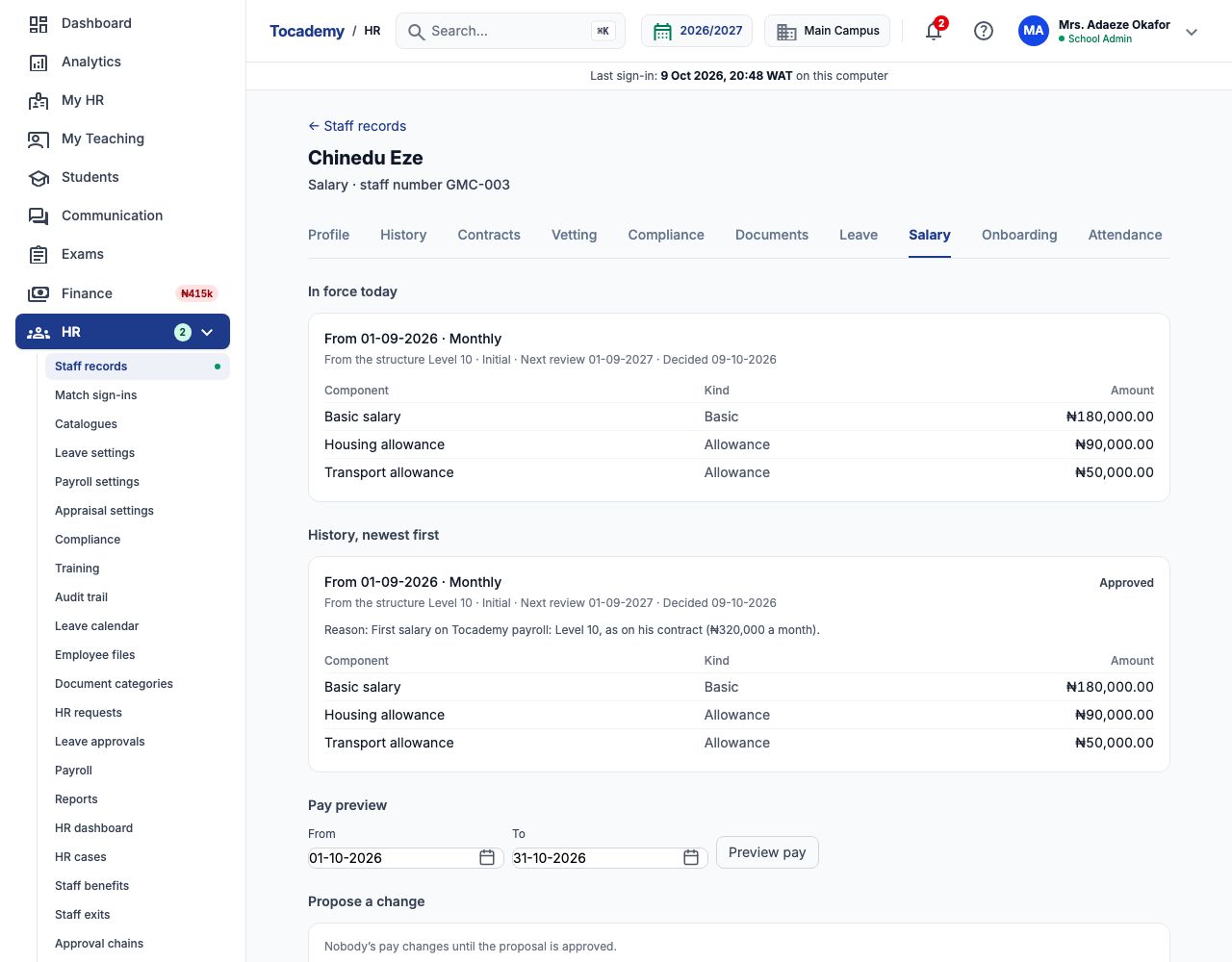
Once approved, "In force today" shows the salary Chinedu is paid on, with its source (the Level 10 structure), the kind of change, the next review date and when it was decided. "History, newest first" keeps every salary he has had, approved, rejected or withdrawn, each with its reason. Only people with permission to see salary figures see the amounts; anyone else sees "Withheld" instead of a figure. From the same tab, the links at the bottom open his adjustments, loans and expense claims.
13. Check the deductions with "Preview pay"
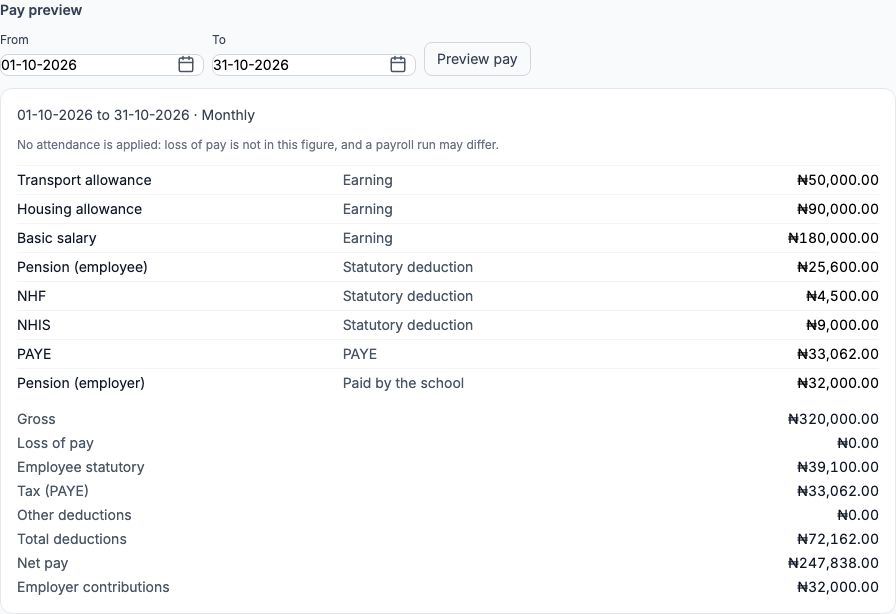
"Pay preview" works out a month's pay without running payroll. Leave From 01-10-2026 and To 31-10-2026 and press "Preview pay". For Chinedu's ₦320,000: pension (employee) is 8% of ₦320,000 = ₦25,600; NHF is 2.5% of the ₦180,000 basic = ₦4,500; NHIS is 5% of basic = ₦9,000. For PAYE, his yearly pay of ₦3,840,000 is reduced by those three contributions (₦469,200 a year) to ₦3,370,800; the first ₦800,000 is taxed at 0%, the next ₦2,200,000 at 15% (₦330,000) and the remaining ₦370,800 at 18% (₦66,744) — ₦396,744 a year, or ₦33,062 a month. His net pay is ₦247,838, and the school also pays ₦32,000 (10%) into his pension. The preview ignores attendance, so loss of pay is not in it.
14. Everyone else's salary, and changes in bulk
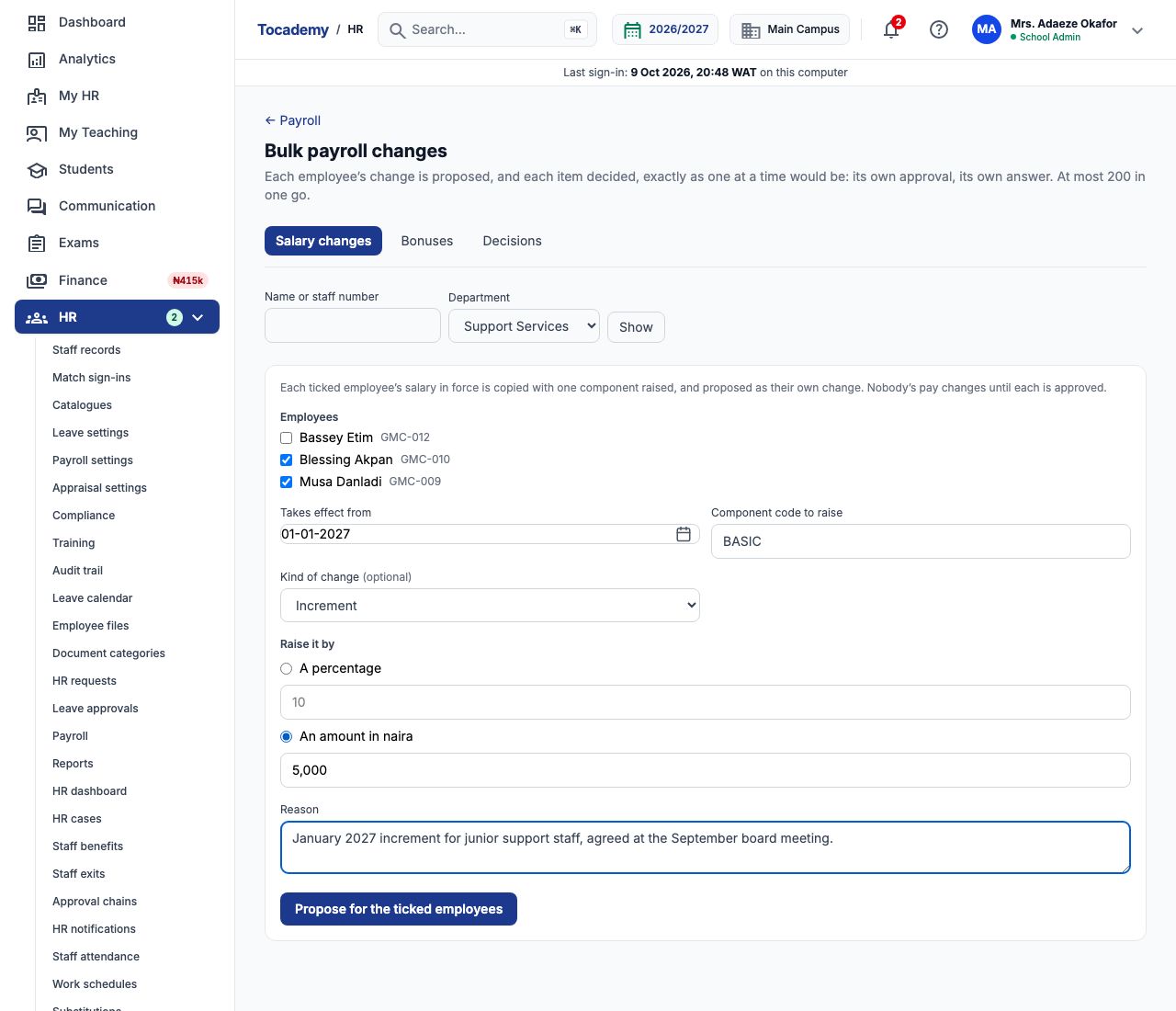
Greenfield gave every member of staff an initial salary the same way, from 01-09-2026: Grace Ojo Level 14 (₦650,000), Emeka Nwosu Level 12 (₦450,000), Ngozi Okonkwo Level 10 (₦320,000), Ibrahim Musa Level 08 (₦230,000), Aisha Bello Level 07 (₦185,000, from her start date of 07-09-2026), and Musa Danladi and Blessing Akpan Level 04 (₦70,000). Tunde Bakare (₦380,000) and Funmilayo Adeyemi (₦240,000) were given explicit lines to match their contracts. To change many people at once, choose "Bulk payroll changes" in the HR menu. On "Salary changes", narrow the list by name or department and press "Show", tick the employees, set "Takes effect from", type the "Component code to raise", choose a percentage or "An amount in naira", and give a reason. Greenfield gave its two Level 04 support staff a ₦5,000 increase on BASIC from 01-01-2027.
15. Each change is still approved on its own
Press "Propose for the ticked employees". "What happened to each" lists every employee and whether their change was proposed or refused — a bulk change is simply one proposal per person, each with its own approval. The approver can decide them one by one on each Salary tab, or open "Decisions" on the same page, tick the ones to decide, choose "Approve the ticked" and press "Record the decision". (On Greenfield's "Decisions" list each row read "An employee this page cannot name", so use "Read it first" to check whose change it is before approving.) The "Bonuses" tab proposes the same one-off bonus for many employees in the same way.

16. A future change in the history
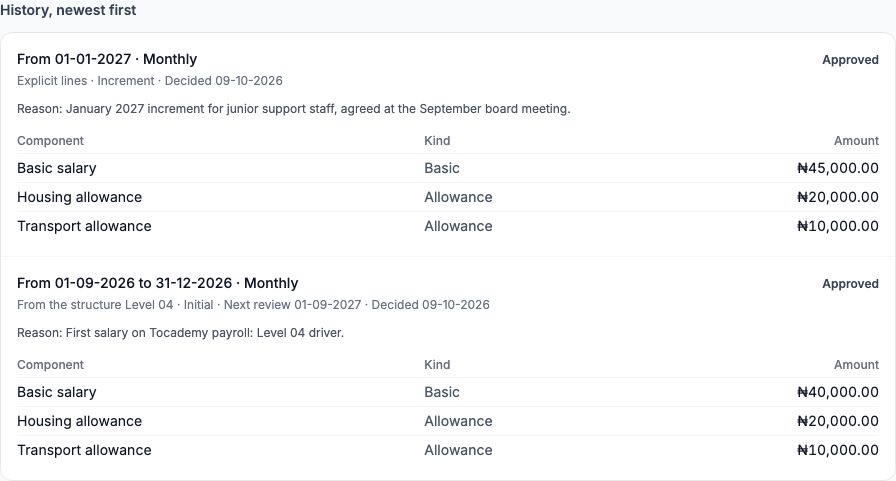
After approval, Musa Danladi's history shows both rows: his Level 04 salary from 01-09-2026 now ends on 31-12-2026, and the new ₦75,000 salary (basic ₦45,000) takes over from 01-01-2027. Payroll for October, November and December still uses ₦70,000; January's will use ₦75,000 automatically. If a change is approved with a date in a month that has already been paid, the next payroll run works out the arrears for you (see the Staff Loans, Expense Claims and Benefits guide). With the settings and salaries in place, you are ready to run payroll.
Still stuck?
Email info@tocel.ng and tell us which guide you were following.